Recruitment CRM
Create a JD, add candidates with résumés, then phone them from the CRM or send a secure interview link over WhatsApp — and get back a scored interview checked against your own screening criteria, with a funnel report per role.
Reviewed & approved · install free · connect your tools
Last updated 2026-10-12
Screenshots
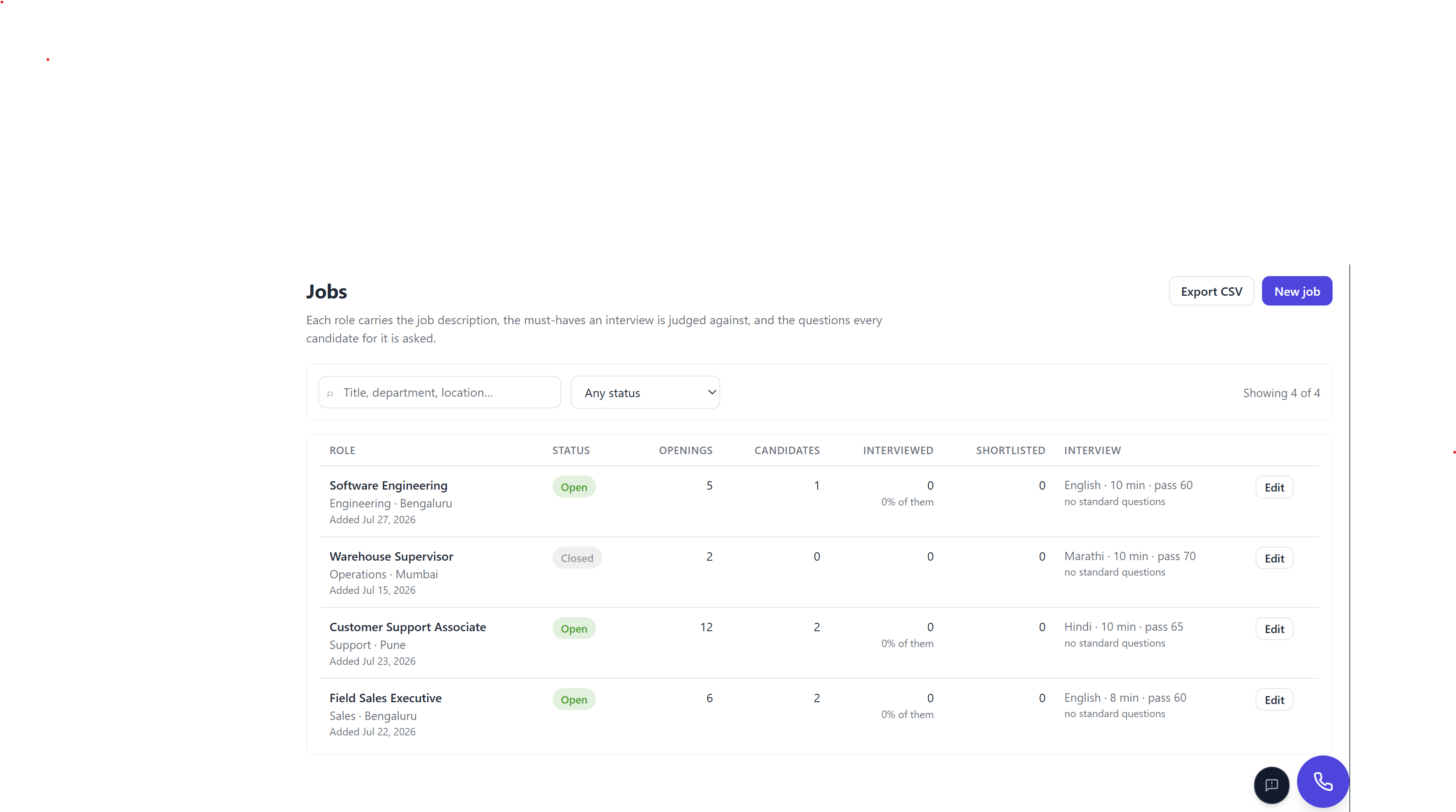
About Recruitment CRM
Recruitment CRM
Create a JD, add candidates with résumés, then phone them from the CRM or send each one a secure per-candidate interview link over WhatsApp — and get back a scored interview checked against your own screening parameters, with a funnel report per role.
Built on the Telenow App Platform. Forked from marketplace-apps/instant-screen, which
covers the inbound-applicant screening case; this app covers the outbound, scheduled,
JD-driven interview case.
Full design: RECRUITMENT_CRM_APP_PLAN.md.
WhatsApp templates: RECRUITMENT_CRM_WA_TEMPLATES.md.
Status
| Built | Not yet |
|---|---|
| 4 objects with relations, views, semantic search | Video capture (#29–31) |
| Jobs list + JD create/edit; closed roles leave the picker | Automatic reminder sweeps — blocked (#26 ← #47) |
| Candidates list, status filters, search, owner + "Mine" | Retention + candidate deletion (#43) |
| Résumés read in the browser — never uploaded — details on the chosen Telenow model | End-to-end test call against a real org (#25) |
| Question generation + per-candidate editor | Meta template submission, Cloud API only (#32) |
Tokenized single-use links + /l/:token page | Second round / handoff to a human interviewer |
| Re-invite, replacement links, reschedule, manual reminders | A close-out on a Cloud channel (needs a template) |
| Bundled interview agent + one-click setup | |
| WhatsApp send (web + Cloud) and email, with delivery log | |
| Close-out message to rejected candidates | |
| Recruiter notes per candidate | |
| Screening — scorecards, competency charts, decision queue | |
| Reports — funnel, by source, CSV export | |
| CSV import with column mapping and a validation preview | |
| CSV export on Jobs, Candidates, Screening and Reports | |
| Read-only shortlist link for a hiring manager | |
| Dashboard — funnel, trend, recent interviews | |
| Call now — the agent phones a candidate from the CRM, live call status | Choosing the caller-ID number per call (the bridge has no fromNumber) |
| Screening parameters — one table: question, “pass if” in plain words, must-have; asked on every call and link, checked against each transcript | Server-side parameter checks (they run while Screening is open) |
| Transcript on every scorecard, with the lines behind each parameter answer marked | |
| Results as one table, a column per parameter; bulk shortlist of everyone meeting every must-have | |
| Import résumés — a batch of files or a whole folder, read under a rate limit, phones verified against the text | Google Drive connection — the platform's Google connector has no Drive scope (see below) |
| Call a list — tick candidates (or Call all after an import); the agent's call queue rings them a few at a time, retries no-answers, keeps going after the tab closes; live status per candidate, Pause / Resume. On a dashboard without the queue, the page calls the list itself (up to 2 at a time, same retries — keep the page open) | Choosing retries per batch (fixed at 3 tries, 5 and 10 minutes apart) |
Project layout
The UI is one bundle serving every manifest page. ui/App.tsx is a router and nothing
else; the pages own their own data reads.
ui/
  index.tsx            mount(App)
  App.tsx              hasTelenow guard → ToastHost → page switch
  lib/
    ui.tsx             the design system: Page, Card, Btn, Field, Modal, Chip, toasts…
    palette.ts         every colour in the app, as CSS custom properties
    charts.tsx         funnel, histogram, trend, split bar, radar, sparkline — hand-drawn SVG
    types.ts           the four objects + the pipeline model (RANK, STATUS_META, FUNNEL)
    helpers.ts         formatting, CSV read/write, validation, the org-roster lookup
    bridge.ts          feature-detected access to ai / links / members / settings.set …
    telenow-ext.d.ts   ambient types for the bridge namespaces SDK 0.4.0 predates
    scorecard.tsx      the one rendering of an interview result, shared by two pages
    invite.ts          the agent briefing, minting links, and the WhatsApp / email wording
    call.ts            Call now — placing the call, following it, wording its errors
    callQueue.ts       Call a list — handing candidates to the agent's call queue, reading it back
    pageDialer.ts      Call a list from the page — for a dashboard without the call queue
    campaigns.ts       queueing candidates in one of the org's own Telenow campaigns
    limiter.ts         rate limiter (shared back-off on 429), worker pool, retry
    resumeImport.ts    contact details out of a résumé — phone checked against the text
    criteria.ts        screening parameters: “pass if” judging, reading answers out of a transcript
    criteriaChecker.ts useCriteriaChecker() — keeps finished interviews checked
    criteriaView.tsx   parameter table, chips and the transcript panel
    transcript.ts      reading a call back (`calls.get`), cached once finished
    resume.ts          which files can be read; legacy download / re-read of stored résumés
    resumeText.ts      a résumé's text, read in the browser (pdf.js, fflate)
    aiModel.tsx        the workspace AI model: choice, catalog, picker
    questions.ts       the question bank, merging and generation
    candidateImport.ts CSV column matching, coercion and per-row validation
    workspace.ts       useWorkspace() — install config + RBAC gates in one hook
  pages/
    Dashboard.tsx  Jobs.tsx  Candidates.tsx  Screening.tsx  Reports.tsx  Setup.tsx
    candidates/    AddCandidate.tsx  BulkCall.tsx  CandidateDetail.tsx  ListCallPanel.tsx
                   QuestionsEditor.tsx  ResumeImport.tsx  ScheduleInvite.tsx  StartCall.tsx
    screening/     ParametersPanel.tsx
  vendor/
    pdfjs.ts           pdf.js, gzipped — GENERATED by `npm run vendor:pdfjs` (scripts/vendor-pdfjs.mjs)
lib/bridge.ts exists because the live dashboard injects namespaces (ai, links,
members, settings.set, agents.setPublic, calls.open, whatsapp.sendTemplate,
files.extract) that the published SDK typings do not declare and the dev mock does not
have. Reading one straight off the bridge throws a synchronous TypeError that no
.catch() on the promise ever sees — which white-screens the page. Every accessor there
either returns the capability or throws a message written for the person looking at it.
Screening
Candidates answers where is this person; Screening answers who should we talk to. Both of its tabs are deliberately plain.
Results is one table: a row per scored interview, a column per screening parameter. Each cell is the candidate's answer with ✓ meets, ✕ doesn't meet, ? not discussed or … not checked yet; then the must-have verdict (or the match % when there are no must-haves) and the pipeline status. Above it: search (name, phone, role), a role picker, three pills (All, Needs a decision, Meets must-haves), a sort (best match, highest score, newest) and four numbers. Show charts opens the score distribution, who meets each parameter (of those who answered, with "not discussed" counted apart) and the competency averages. Shortlist N who meet every must-have moves undecided candidates only, after a confirmation, and sends nobody anything. The CSV export has a column per parameter.
A row opens the scorecard: the parameters with the candidate's own words one click away, the agent's score and competencies, the call's transcript (loaded on demand, the lines behind each answer marked), recruiter notes, and Shortlist / Reject.
Screening parameters
Screening → Parameters is one table, edited in place. A parameter is four things:
| Column | What it is |
|---|---|
| Parameter | the name — Notice period |
| Question the agent asks | asked word for word, in the candidate's language. Empty = judged from the whole call (right for Communication) |
| Pass if | plain words — 30 days or less, Yes, At least 1 year. Empty = the answer is just noted |
| Must-have | flags anyone who doesn't meet it. Needs a Pass if |
Add basic parameters adds notice period, expected salary, current location, relevant experience and communication in one click — none of them must-haves — skipping any already there. + Add parameter adds your own. Edit and Delete are on every row.
What happens to a parameter:
- Its question is asked first in every call and every link minted after it is saved
(
interviewBriefing), so an interview that closes early has still asked it. Links already sent keep their questions. - The transcript is read for it — one AI call per interview, on the workspace model from
Setup, billed to the org's Telenow credit. It stores a short answer, whether it meets Pass
if, and the candidate's own words on
interview.criteria_answers, signed with the parameter's name, question and pass-if. Editing any of the three re-reads finished interviews: up to 20 automatically per page load and per change, the rest behind Check now. Ticking must-have costs nothing.
Post-call analysis cannot do step 2: its fields are fixed on the agent, one agent serves every
role, and it never sees the call's variables. So the CRM reads the transcript itself
(calls.get) while Screening is open. "Not discussed" is never a fail, but it counts against
the match %, which is how much of what you asked for is confirmed.
Parameters saved by 1.1–1.3 (typed rules — yes/no, a number with limits, a rating, a choice — and role-only scope) keep working: the old rule is shown as Pass if text (30 days or less), and saving the row stores that text and retires the typed rule. A role-only parameter shows Only for … until you untick it in the editor.
Calling a candidate
Call now (candidate row and record) has the interview agent phone the candidate straight
away — the other door into the same interview. It hands the agent exactly the briefing a link
would (interviewBriefing), including candidate_id / job_id, so the existing workflows file
it: call.started opens the interview row the moment someone answers (now recording
channel: telephony), call.analyzed scores it, and the scorecard lands on Screening like any
other.
A call needs the agent's id, not its public slug, so it works while the agent is unpublished. It does need a phone number assigned to the agent — the error says so.
An unanswered call never fires call.started, so the dial itself is tracked on the candidate
(last_call_session / last_call_at / last_call_status) and followed with calls.get
every few seconds: Ringing… → On the call → Call finished, or No answer / Line busy / Didn't
connect. A no-answer is not an interview and never moves the funnel. Needs the new
calls:initiate scope — an admin accepts the updated permissions when upgrading to 1.1.0.
Calling a list
Tick candidates on the list (the header box ticks everyone shown) and press Call N — or
Call all after a résumé import. Nothing is set up in Telenow: each candidate is handed to the
interview agent's call queue (calls.initiate(…, { queue: true }), ui/lib/callQueue.ts),
a campaign the platform keeps for the agent and runs by itself. It:
- dials as many at once as the workspace allows — the smaller of the org's concurrent-call limit (10 when none is set) and the per-number limit on the agent's caller ID (2 by default; a platform admin raises it in Admin → Billing accounts);
- rings a no-answer or busy line again — 3 tries, about 5 and then 10 minutes apart;
- re-checks the Do-Not-Call list at dial time, never queues a number twice, and carries on after the page is closed. A drained queue reopens by itself for the next list.
The confirm dialog says who will be rung, who won't and why (no phone, nothing to ask, already
waiting). The first candidate is sent alone: a dashboard older than the queue ignores the
queue option and dials at once, so if the reply isn't queued the rest are not sent.
Each candidate is marked last_call_via: 'queue', and while the Candidates page is open the
queue is read back every few seconds (calls.queue): Waiting to be called → Dialling… →
Ringing… → On the call → Call finished, or No answer — try 2 of 3 in 5 minutes, ending in
No answer after 3 tries. Answered calls are filed exactly like Call now — the queued call's
variables carry candidate_id / job_id for the call.started / call.analyzed workflows. A
panel above the list counts who is on a call, waiting and due a retry, with Pause /
Resume calling (calls.pauseQueue / resumeQueue); pausing stops new dials for everyone
using the interview agent, and calls already ringing finish.
The queue needs a dashboard with it on the app bridge (calls.queue). The app reads the queue
only for agents bound to it.
From the page, when the dashboard has no call queue
On a dashboard without calls.queue, Call N still works: the Candidates page calls the list
itself (ui/lib/pageDialer.ts), using the same calls.initiate that Call now uses, so every
call is briefed, filed and followed exactly like one. It needs nothing from Telenow beyond what
Call now needs (calls.initiate + calls.get), and when the dashboard does gain the queue the
app switches to it by itself.
- Up to 2 calls at once, the platform's default per-number limit. The next call starts the moment a line frees.
- "Line full" is waited out, never counted. The platform answers 429 ("This number is already on its limit of 2 simultaneous calls"); the list waits 30 seconds or until a call ends, and from then on runs only as many lines as were actually working.
- Same retries as the queue: a no-answer or busy line is rung again about 5 and then 10 minutes later, 3 tries in all.
- An account problem pauses the list. The same refusal twice in a row (no quota left, no number on the agent, a missing permission) pauses it with the reason shown, and puts back whoever it refused; Resume carries on once it's fixed.
- A panel above the list counts who is on a call, waiting, due a retry, reached or not, with Pause / Resume, Stop (nobody new is rung, not even a retry; calls already going finish) and the list itself. Each waiting row says Waiting to be called or No answer — ring 2 of 3 at 3:42 PM, and its Call now is locked so nobody is rung twice.
The price of running from a page: the list only moves while the Candidates page is open. A call already ringing carries on if the page is closed, but nobody new is rung, and the list is not remembered across a reload. Both the confirm dialog and the panel say so.
Importing résumés
Add candidates → From résumés (also Import résumés in the Candidates header) takes a batch of files or a whole folder (drop it, or Choose a folder) and turns each résumé into a candidate the agent can phone. Nothing is uploaded to Telenow:
- Read it in the browser (
ui/lib/resumeText.ts) — pdf.js for PDF, fflate for DOCX (body, headers and footers — CV templates put the contact line in the header), the bytes for TXT/MD. - Find the details — one call per résumé to the chosen Telenow model (see below) for name, phone, email, city, experience, current role, CTCs, a summary and a short profile (roles with employer and years, skills, education, languages).
- Review — every row is editable before anything is written; duplicates (by the last ten digits of the phone, against the CRM and within the batch) are held back.
- Add — the candidate stores the details, the profile and the file's name. Never the file
(
resume_path) and never its full text (resume_text); both fields only exist on candidates imported before 1.3.0. The question generator works from the summary and the profile. - Call from the same screen: Call now per row (two-step confirm), or Call all N for the batch — the call queue (see Calling a list). On a dashboard without the queue, Call all N hands the batch to the Candidates page, which calls it from there; only a dashboard that can't read a call back falls back to Send N to a campaign.
A candidate's own record has Read a résumé file / Paste résumé text, which work the same way and never change the name or phone already on file. The single-candidate form no longer takes a résumé at all.
Edit details (bottom of a candidate's record, beside Delete candidate) edits everything on their record in place: name, phone, email, city, role, status, source, experience, current role, both CTCs, the résumé summary and the résumé details. It writes only the fields that changed, so a status the agent moved on while the form was open (a call starting) is never undone. A phone another candidate already has is refused, a role change leaves past interviews on the role they were held for, and a cleared box really clears the field.
Why in the browser. The old route stored the file (files.put) and extracted it on the
server (files.extract); on at least one install that step failed with the platform's masked
500 ("Something went wrong"). The AI gateway can't take the file instead — ai.llm messages are
text only (routes/app_ai.rs MsgIn { content: String }).
pdf.js is vendored, pre-compressed, in ui/vendor/pdfjs.ts (from npm run vendor:pdfjs,
which records a SHA-256 checked before it runs). Imported normally it took the bundle to 8.6 MB,
past the platform's 8 MB UI-bundle cap — telenow build repeats every source inside an inline
sourcemap. Vendored it costs ~0.8 MB and is unpacked only when the first PDF is read. It runs on
the main thread (pdf.js's globalThis.pdfjsWorker "fake worker"), since this app lives in a
sandboxed, opaque-origin iframe. Scanned PDFs have no text to read and say so.
The AI model is a workspace setting (ai_model), chosen on Setup from Telenow's own
catalog (ai.models()) and billed to the org's Telenow credit — there is no outside AI key. It
applies to résumé reading, question writing and screening-parameter checks; blank means Telenow's
default for each task (balanced for résumés, smart for the other two). The résumé import can
switch model for one batch. A model with no platform key fails with a plain "not available on
your Telenow plan — choose another".
Rate limits. Three résumés are read at a time. AI calls go through one shared limiter — two at once, starts 600 ms apart (≈1.6/s, under the gateway's 2/s-per-app bucket), and when the platform answers 429 the whole queue backs off and retries the refused call first. A file that can't be read fails at once, with the reason, and can still be added by typing the name and phone. Pause, Retry failed, 300 files a batch.
The phone is the one field never taken on trust — it is the number the agent will dial. A number is used only if it is literally written in the résumé (found by pattern: Indian mobiles in any spacing, or anything with an explicit country code; year ranges, PIN codes and dates don't match). A number the AI produces that is not in the text is replaced by the one that is. A résumé with more than one number (a referee's, an old employer's) goes to Needs a look and starts unticked, as does a name guessed from the file name — a person ticks it after checking. Closing the dialog with résumés read but not added asks first.
Campaigns (the fallback where the call queue isn't available) need the
campaigns:write scope (1.2.0) and a campaign created in Telenow with the interview agent — the panel warns when a campaign dials with a different agent. Each
target carries the full interview briefing, so answered calls are filed and scored like any
other interview.
Cloud storage. A Google Drive, OneDrive or Dropbox folder synced to the computer is a
folder, and works today — still read in the browser, still never uploaded. A direct Google Drive
connection does not, for platform reasons: the google connector grants Calendar, Sheets and
Gmail-send only (no Drive scope), it has no proxyHosts so its credential can't be injected
through the HTTP proxy at all, and the proxy returns bodies as UTF-8 text capped at 1 MB — a PDF
does not survive it. Signing in to Google from the app itself is no way round it either: the
iframe's origin is opaque (null), which Google will not accept as an authorised origin. All of
these are platform changes, not app ones.
Importing candidates
Candidates → Add candidates → Import a CSV. Built for what recruiters are actually sent: exports from Naukri, LinkedIn and hand-maintained spreadsheets, which agree on almost nothing.
- Columns are matched by name. "Phone", "Mobile", "Mobile No." and "Contact Number" all find the phone column; anything matched wrongly can be repointed by hand.
- A header row is detected, not assumed. A file with no header is common (someone pasted a column out of a bigger sheet), and treating a real candidate as the header loses them.
- Phones are coerced, not rejected.
9876500021,09876500021and+91 98765 00021all become E.164, and the preview shows what each one was. Anything ambiguous is left exactly as typed so validation still catches it. - Everything is shown before anything is written: which rows will be added, which are broken and why, and which already exist. Duplicates are matched on the last ten digits, because importing the same person twice gives them two links — whichever they open, the other looks like a no-show.
The parser is hand-rolled rather than split(','): quoted cells containing commas, embedded
newlines, doubled quotes and CRLF all appear in real files, and splitting on commas mangles
all four silently.
Sharing with a hiring manager
The person who decides is usually not a Telenow user. Reports → Share with a hiring
manager mints a page link: a read-only summary of the interviewed candidates, built
server-side at mint time, so the recipient cannot widen the list, change the filter, or
reach a candidate who wasn't shared. Not single-use (an HM will open it twice) — it expires
after 72 hours instead.
Export CSV covers the other half: it exports exactly what the filters select, quotes
everything, and prefixes any cell starting with =, +, - or @ with an apostrophe so
Excel doesn't execute a candidate's name as a formula.
Needs migration 0221_app_public_links.sql applied, or minting a link fails at the
API. Two known gaps: an email-only invite has no channel to deliver the access code on,
and a WhatsApp web send returns no wamid, so its delivery status can't be tracked.
Link actions, and why there are three
A single-use link plus a fallible messaging channel means "issue a link" happens more than once per candidate. The row offers three actions and they are not interchangeable:
| Action | When | Effect on the funnel |
|---|---|---|
| Invite | status added | creates the first interview row |
| New link | invited / sent / scheduled | replaces the link on the existing row — same attempt |
| Invite again | any terminal status (no_show, expired, declined, closed_early, completed, evaluated, shortlisted, rejected) | creates a second interview row; the first keeps its score |
A reschedule is "New link with a different slot", and it is detected rather than chosen: the link's opening time is baked in server-side at mint, so moving a slot always needs a new link. When the slot changes, the panel sends the moved wording instead of a fresh invitation — the candidate has already had one of those.
The distinction is the whole point. A candidate who no-showed and was re-invited is one candidate with two scheduled attempts; a candidate whose link was replaced is one attempt. Collapsing them either inflates "scheduled" or loses the first score — and the recruiter is the one who has to explain the numbers.
All three mint first and revoke the old link after the new one is recorded: minting can fail, and a candidate left holding nothing is worse than one holding a stale link. If the revoke then fails, the panel says so explicitly rather than implying the old link is dead.
Reminders are manual. The automatic 1-hour / 10-minute sweep needs a platform primitive that doesn't exist yet (#47), so the row has a Remind button that sends the reminder wording with the same link. The scheduling field used to claim reminders went out automatically; it no longer does.
Choosing the interview agent
Setup has a live picker of the org's agents. Choosing one — or pressing Create the interview agent to build this app's own — does three things in a single action:
- builds the agent from the bundled
interview-agentmanifest template, when creating (auto-bound to this app's tools and knowledge base), - publishes it and reads back its public slug,
- writes
interview_agent_id+interview_agent_sluginto app settings, which is what the read-only ID and slug fields on the page are showing.
Neither field is ever typed by hand. A mistyped UUID produces an interview link that opens onto nothing, and the candidate is the one who finds out.
A link resolves by public slug, never by agent id. An agent that is chosen but not published looks finished and cannot open a single interview — so that state gets a warning on Setup, a Publish this agent button next to it, an incomplete checklist row, and its own message on Candidates where invites are switched off. Do not unpublish the agent in Agents: it kills every link already sent.
Switching agents is just re-picking from the list. The id and the empty slug are written together, so no link can be minted against a new agent while the previous agent's slug is still on file. Only interviews started after the switch use the new agent.
Nothing about a specific job or candidate lives on the agent. The questions, role, must-haves, résumé summary, language and time budget travel with each candidate's link and are handed over when the candidate opens it — so one agent serves every JD and every candidate, and the org user only ever adds JDs.
The agent id is written before publishing, so a failure at step 2 (a non-admin user, say) leaves a state where pressing the button again finishes the setup rather than creating a second, orphaned agent.
Requires owner or admin — the platform gates both saving app settings and publishing an agent on role, not on permissions.
Data model
| Object | Holds | Notes |
|---|---|---|
job | the JD | jd_text feeds question generation; must_haves drives early close |
candidate | the person | relation → job; semantic: true so ?search= ranks by meaning over resume_summary; résumé details only (resume_summary, resume_profile, resume_file) — never the file |
interview | one row per attempt | relations → candidate + job; session_id joins to the platform call |
message_log | send audit | answers "did we actually send the link?" — the first question on a no-show |
screening_criterion | one screening parameter | pass_if in plain words; position orders the questions; rows from 1.3 and earlier may carry a typed rule or a job scope |
interview is deliberately separate from candidate: reschedules and second attempts
corrupt a single-row model, and the funnel needs scheduled and taken as independent
counts.
Pipeline
added → invited → sent → scheduled → started → completed → evaluated
                                                            ├─ shortlisted
                                                            └─ rejected
   ↘ declined   ↘ expired   ↘ no_show   ↘ closed_early ─────┘
Off-ramps carry the rank of the furthest stage actually reached (RANK in ui/lib/types.ts),
so a no_show counts toward scheduled but never toward taken. closed_early counts
as taken — the candidate did the interview, it just ended early — and is terminal but
scorable, not a rejection.
No sample data
The app ships with none, and seeds nothing on install. A fresh install is empty and every row is created through the UI, so a real pipeline is never mixed with demo rows a recruiter then has to identify and delete.
Local development
npm install
npm run validate
node node_modules/telenow/bin/telenow.mjs dev --port 5179
The dev mock bridge deliberately has no links, ai or members, so the degraded
paths are the ones you exercise locally: Invite reports that secure links are unavailable,
"Generate questions" is disabled with the reason on it, and owner names render as nothing
rather than as "Someone who has left".
Mock data persists in localStorage under telenow.dev.data.recruitment-crm — clear that
key to start from an empty store again.
Typecheck (esbuild bundles without typechecking, so run this separately):
./node_modules/.bin/tsc -p tsconfig.json
★ WhatsApp needs scopes from BOTH planes
WhatsApp is enforced in two different layers under two different names, and this app
touches both — so it declares whatsapp:send and whatsapp/whatsapp:templates:
| Call | Plane | Scope |
|---|---|---|
| "Send link" button on the Candidates page | UI bridge (AppPageHost.tsx) | whatsapp:send |
Poller / backend POST /api/app-whatsapp/send, /send-template | app-key REST (Rust) | whatsapp |
| Naming an approved Meta template | app-key REST | whatsapp:templates |
Declaring only one silently fails on the other plane with a runtime 403 — there is no
server-side scope whitelist, so nothing catches it at upload. Workflow send-message
steps are a third case: they do no scope check at all and are authorised by the install.
See /docs/app-scopes → WhatsApp uses two different scope names.
★ Copy buttons need clipboard-write delegated
App pages run in a sandboxed iframe on an opaque origin, where Permissions Policy
defaults clipboard-write to self — so navigator.clipboard.writeText() rejects unless
the host iframe carries allow="clipboard-write" (it now does). CopyButton in
ui/lib/ui.tsx still falls back to a execCommand('copy') textarea, and if that fails too
it reveals the text in a selectable field rather than doing nothing. A copy button that
silently no-ops is worse than none — the recruiter pastes whatever was already on the
clipboard into WhatsApp and sends it.
Ready-made agents it ships
Runs each candidate's approved question list as a structured voice interview in their own Indian language, closes early and gracefully when they clearly do not meet a hard requirement, and returns a scored English scorecard against the role's must-haves.
Data it manages
Permissions it requests
Apps run inside your workspace under least-privilege scopes you can see up front. This app asks for:
objects:jobobjects:candidateobjects:interviewobjects:message_logobjects:screening_criterionagents:readagents:writecalls:readcalls:initiatecampaigns:writeai:llmfiles:readfiles:writelinks:readlinks:writeconnection:googlehttp:gmail.googleapis.comwhatsapp:sendwhatsappwhatsapp:webwhatsapp:templatesmembers:readuser:profilePublisher
Marketplace publisher · app reviewed by Telenow before listing.
Your data, your keys
Apps run inside your own workspace under least-privilege scopes. Telenow is the control plane — the AI, telephony and data stay on accounts you own.
Secrets, carrier credentials and API keys stored AES-GCM encrypted; TLS in transit; HMAC-signed webhooks.
Strict per-organization data isolation with role-based access for every member.
Every mutating action is logged and filterable, with CSV export for your records.
In-app carrier applications (A2P 10DLC, regulatory bundles, India business KYC), TCPA calling windows, and org-wide Do-Not-Call enforcement.
More recruitment apps
Screen every job applicant with a structured call in 60 seconds and hand recruiters a ranked shortlist.
Install Recruitment CRM
Sign up free and get $1.00 in credit — no card required. Connect your number, pick a template, and go live in minutes.