
Instant Candidate Screening
Screen every job applicant with a structured call in 60 seconds and hand recruiters a ranked shortlist.
Last updated 2026-07-12
Screenshots
About Instant Candidate Screening
Instant Candidate Screening
Screen every job applicant with a structured voice call within 60 seconds of applying — capture typed answers, auto-score fit, and hand recruiters a ranked shortlist.
Built on the Telenow App Platform as a pure declarative app: the data model, the agent tools, the applicant webhooks, the screening workflow, the vernacular agent, and the screening-playbook knowledge base all run on-platform. No external server.
The problem (and the number)
Recruiter screening is where hiring quietly bleeds time and money. Manually calling, qualifying, and note-taking eats roughly 23 recruiter-hours per hire, and each phone screen costs $32–58 in loaded recruiter time. Meanwhile speed is everything: fewer than 1% of organisations reach an applicant within 5 minutes — and for high-volume, hourly, and blue-collar roles the best candidates are gone in hours, often already screened by whoever called first.
Instant Candidate Screening closes that gap. The moment an application lands, it calls the candidate, runs a consistent structured screen in their own language, records every typed answer, scores fit against the role, and drops a ranked shortlist on the recruiter's desk — before a human has read the first résumé.
How it works
Meta Lead Ads / ATS  ──(applicant webhook)──►  candidate object (status: new)
        │                                              │
        │                                   fires object.candidate.created
        ▼                                              ▼
   dedupe on phone            ┌──────────────────────────────────────────────┐
                              │ notify_new_candidate → WhatsApp heads-up      │
                              │ screen_new_candidate → delay ~30s →           │
                              │   outbound-call {{settings.screen_agent_id}}  │
                              │     → dials {{trigger.data.phone}}            │
                              │     → passes name, role, source, location     │
                              └──────────────────────────────────────────────┘
                                              │
                                              ▼
                        Instant Screening Agent (Sarvam, vernacular)
                        find_candidate → structured Q&A → record_answer
                        → set_fit → shortlist | reject
Every answer the agent captures and every status it sets updates the same candidate rows you see on the dashboard — ranked by fit — and the dashboard's Call now button re-screens any applicant through the same agent and tools.
Agent tools (used mid-call — all declarative)
| Tool | Does | Handler |
|---|---|---|
find_candidate | Look up the applicant by phone to load their role + prior answers | object.query candidate |
log_candidate | Record a brand-new applicant who comes in during the call | object.create candidate |
record_answer | Save the captured screen answers (availability, expected salary, location, shift, languages, two-wheeler) | object.update candidate (match phone) |
set_fit | Save the computed 0–100 fit score; moves the candidate into screening | object.update candidate (match phone → status screening) |
shortlist | Candidate cleared the cutoff — qualified screen | object.update candidate (match phone → status shortlisted) |
reject | Hit a disqualifier or fell below the cutoff | object.update candidate (match phone → status rejected) |
The bundled Instant Screening Agent is a multi-context flow: a deterministic find_candidate tool node (looks the caller up in this app's data) → a conversation node that runs the ordered question list, scores fit, and sets status. STT/TTS default to Sarvam (anushka) so Tier-2/3 and vernacular applicants are screened in Hindi, Tamil, Telugu, Kannada, Marathi, or English.
Dashboard pages
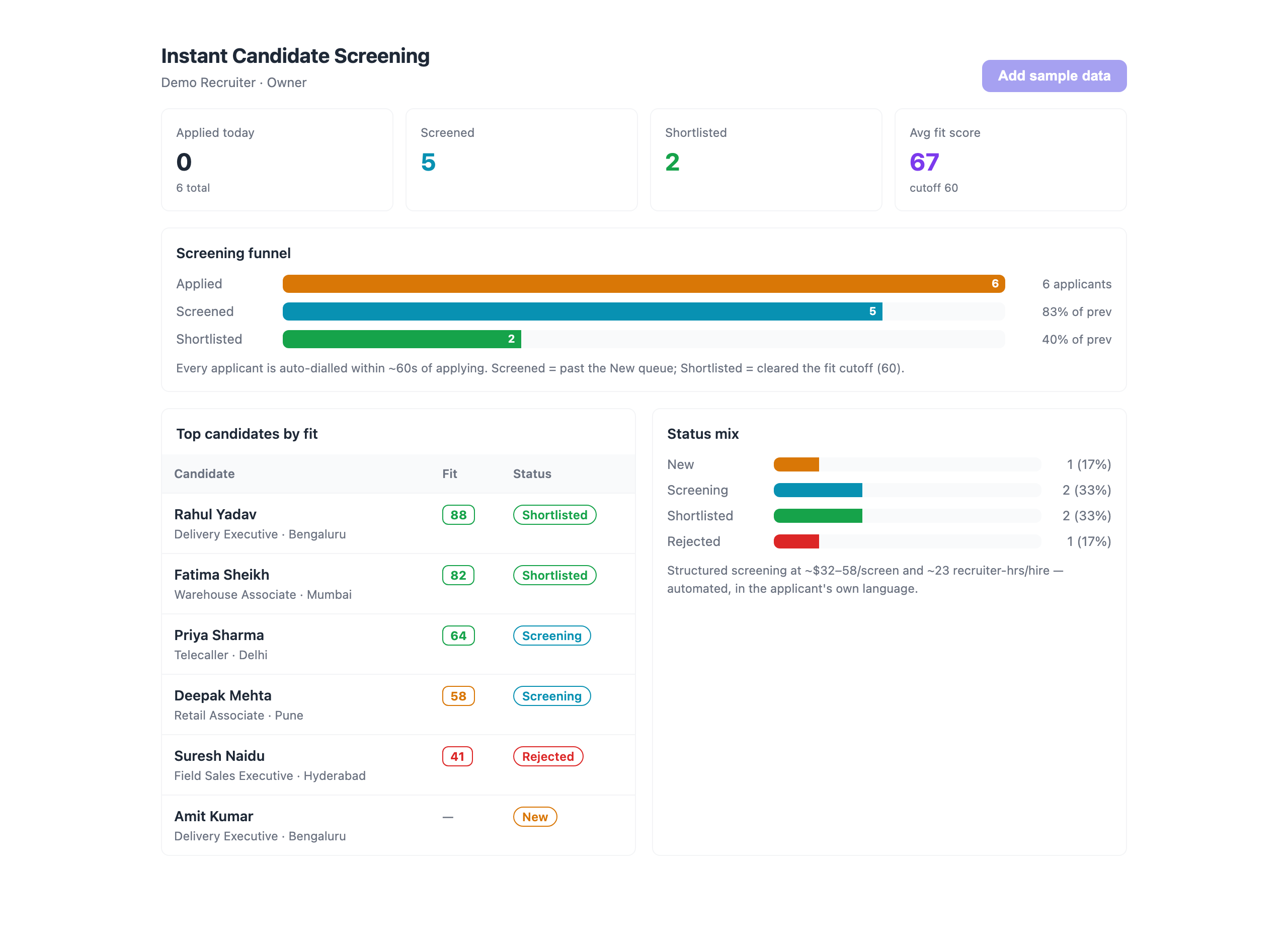
- Instant Candidate Screening (dashboard) — KPI tiles (applied today, screened, shortlisted, average fit score), the applied → screened → shortlisted funnel with drop-off, top candidates by fit, and a status mix. Also powers the platform
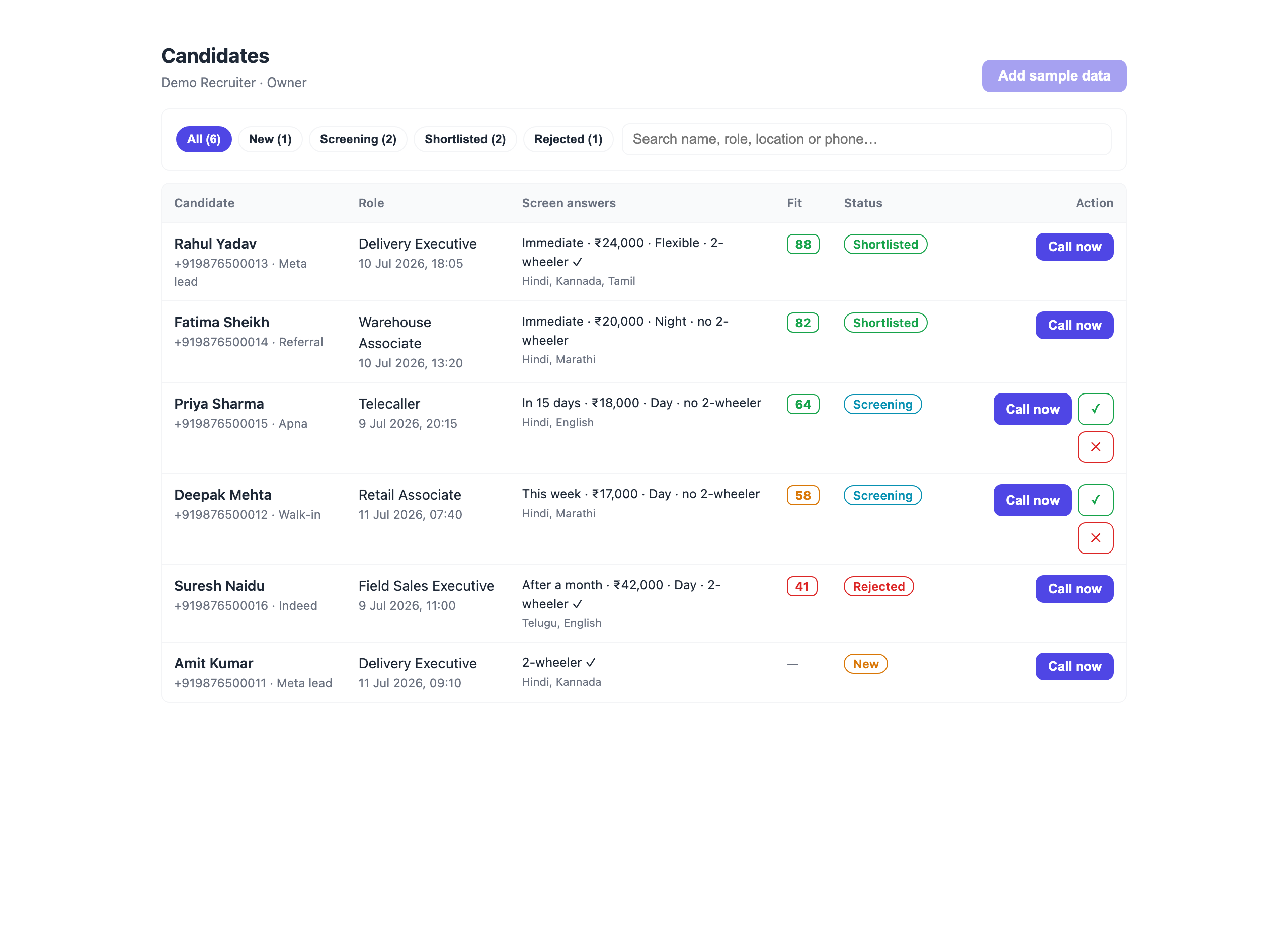
dashboard_widgetslot in a compact form. - Candidates — the ranked shortlist: status filter chips, search, a colour-coded fit pill against your cutoff, the captured screen answers inline, and per-row Call now (passes the candidate's context variables to the agent) plus quick shortlist/reject.
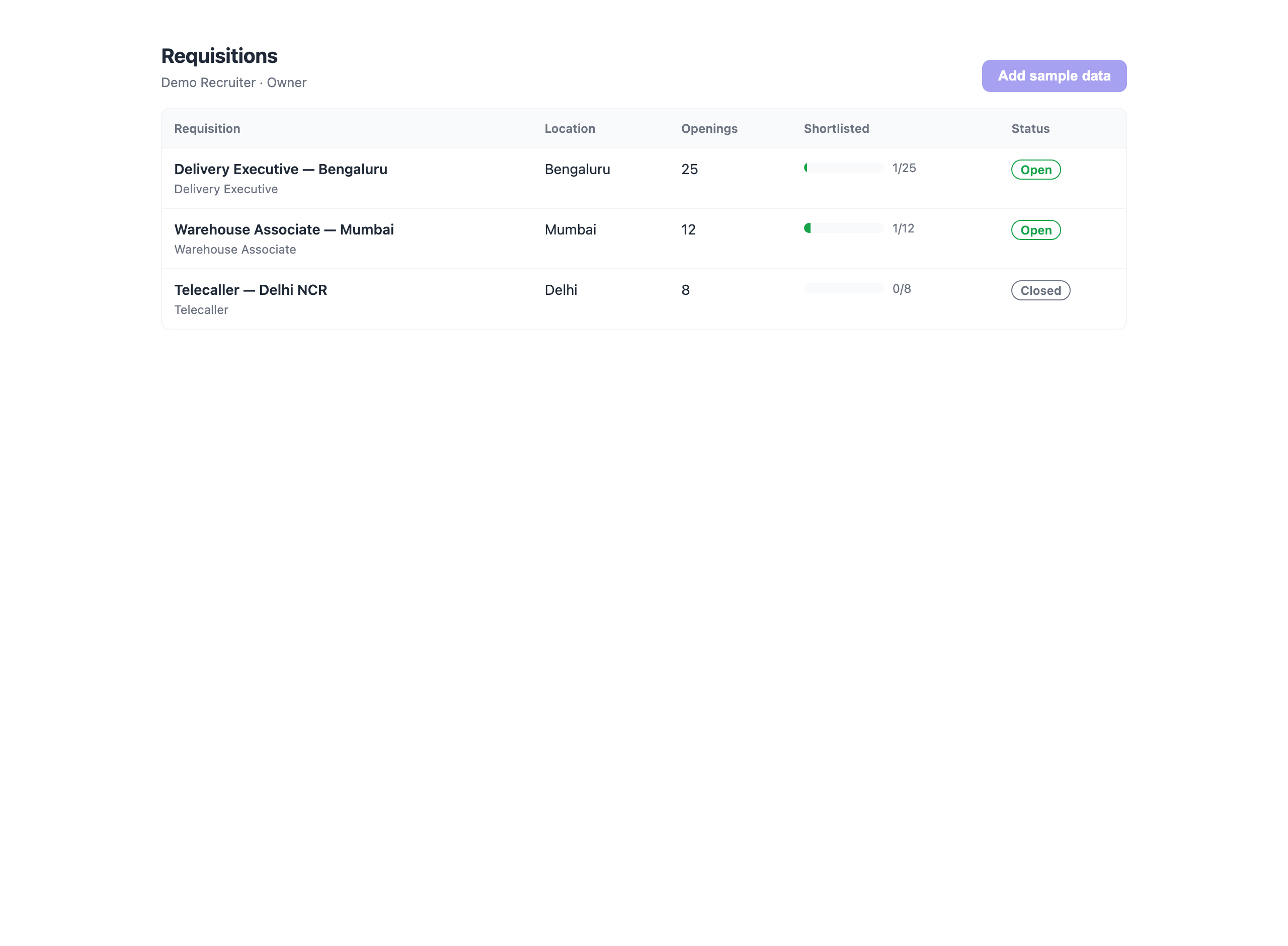
- Requisitions — open roles with openings, location, status, and shortlisted-vs-openings fill progress.
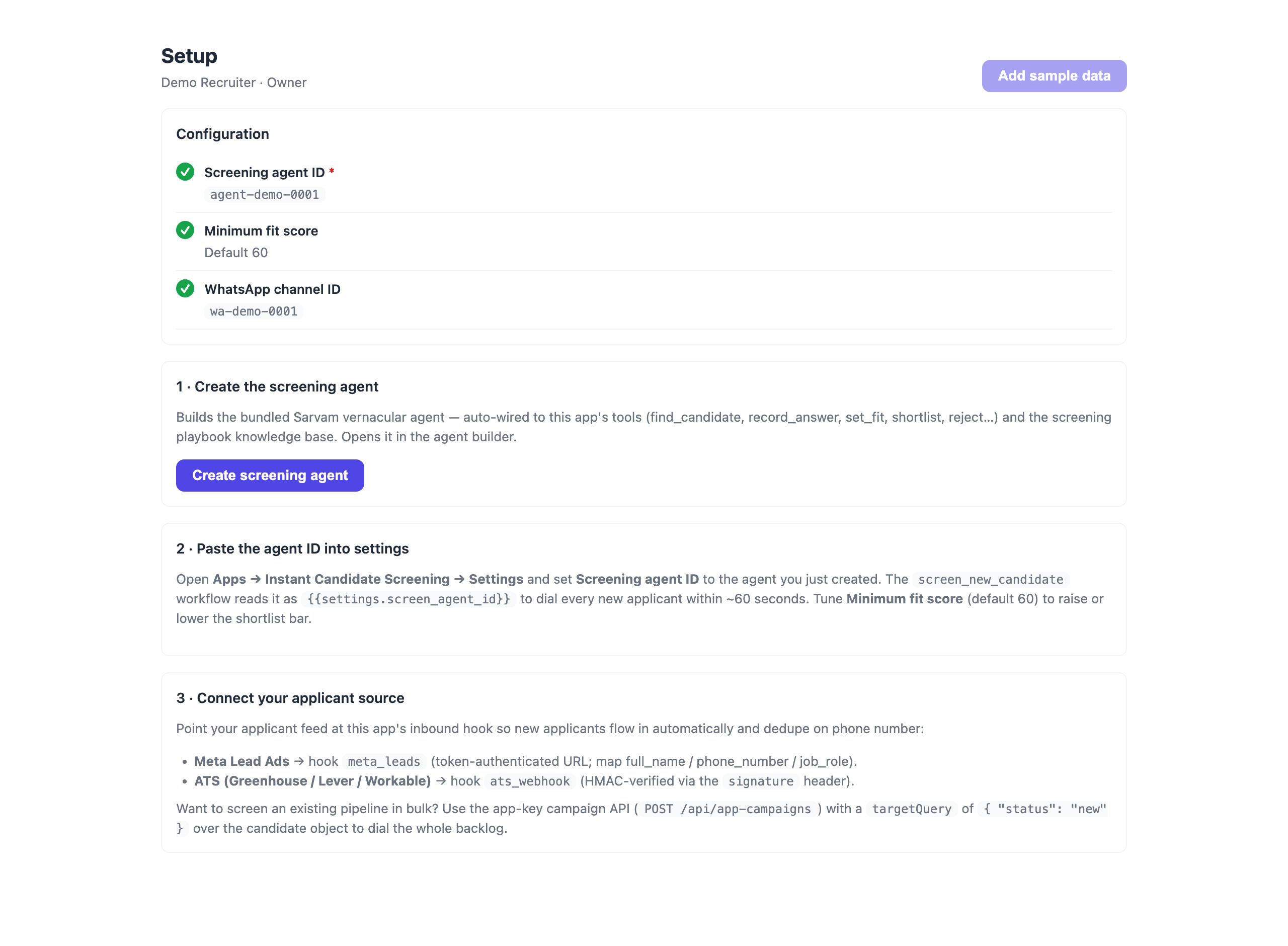
- Setup — a configuration checklist, a one-click Create screening agent button, and the post-install wiring steps.
Knowledge base
screening-playbook ships four real docs the agent screens from: the structured question list (asked in order), role requirements (per-role must-haves), instant disqualifiers (hard stops), and the 0–100 fit scoring rubric.
Install & post-install wiring
- Install Instant Candidate Screening into your org.
- Open Setup → Create screening agent (builds the bundled Sarvam agent, auto-wired to the tools + KB).
- Copy the new agent's ID into the app's Screening agent ID setting (
screen_agent_id) soscreen_new_candidatecan dial. - (Optional) Set Minimum fit score (
min_fit_score, default 60) to move the shortlist bar, and WhatsApp channel ID (wa_channel) to auto-send applicants a screening heads-up. - Point your applicant source at the inbound hook —
meta_leads(token-authenticated URL, for Meta Lead Ads via a normalizer) orats_webhook(HMAC-verified with thesignatureheader, for Greenhouse / Lever / Workable). New applicants now flow in, dedupe on phone, and auto-dial within ~60 seconds.
Settings
| Key | Type | Notes |
|---|---|---|
screen_agent_id | text (required) | The agent the workflow + "Call now" dial. |
min_fit_score | number | Shortlist cutoff, 0–100 (default 60). |
wa_channel | text | WhatsApp channel for the screening heads-up. |
Bulk-screen your pipeline
The real-time path (webhook → workflow → call) covers new applicants. To screen an existing pipeline in one sweep, use the app-key campaign API:
POST /api/app-campaigns
{ "agentId": "<screen agent id>",
  "targetQuery": { "status": "new" },      // over the `candidate` object
  "result": { ... write-back ... } }
Point targetQuery at any saved view (to_screen, screening) to re-screen a segment.
Monetization
Instant Candidate Screening is billed on outcomes, not seats: per qualified screen — a small fee each time the agent completes a structured screen and returns a scored candidate (a shortlisted or rejected decision with a saved fit_score). You only pay when a real applicant is actually screened and ranked, which maps directly to the recruiter hours and per-screen cost it removes. Suspected duplicates and unreachable numbers are not billed.
Ready-made agents it ships
A vernacular (Sarvam) agent that calls every new applicant within a minute of applying, runs the structured screening question list, captures typed answers (availability, salary, location, shift, languages, two-wheeler), scores fit against the role, and shortlists or rejects.
What your agents can do with it
Look up the applicant's record by their phone number to load their role, source, and any answers already captured before starting the screen.
Record a brand-new applicant if someone calls in or applies during the conversation and is not yet in the system.
Save the structured answers captured during the screen: availability, expected salary, location, shift preference, spoken languages, and whether they own a two-wheeler. Call this once you have the applicant's replies.
Save the computed fit score (0–100) for the candidate against the role's requirements, using the scoring rubric from the knowledge base.
Mark the candidate as SHORTLISTED when they meet the role requirements and clear the fit-score cutoff — this is the qualified-screen outcome recruiters act on.
Mark the candidate as REJECTED when they hit an instant disqualifier or fall below the fit-score cutoff. Be polite on the call.
Data it manages
Permissions it requests
Apps run inside your workspace under least-privilege scopes you can see up front. This app asks for:
objects:candidateobjects:requisitionagents:readcalls:initiatecalls:readai:llmwhatsapp:sendcampaigns:readmembers:readuser:profileWhat's new in v1.1.0
Changelog
1.1.0 — 2026-07-12
- Renamed to Instant Candidate Screening (business-friendly) with a marketplace icon.
- Added real UI screenshots (dashboard + key pages).
- Verified end-to-end loop closure: trigger → workflow → call → agent tools → write-back → dashboard.
1.0.0
- Initial release.
- Data model:
candidateobject (name, phone, role, source, availability, expected_salary, location, shift, languages, two_wheeler, fit_score, status, created_at) withto_screen/shortlist/screeningsaved views, plus arequisitionobject (title, role, openings, location, status) with anopen_reqsview. - Agent tools (declarative):
find_candidate,log_candidate,record_answer,set_fit,shortlist,reject. - Bundled agent: Instant Screening Agent — a Sarvam vernacular multi-context flow (deterministic
find_candidatelookup → structured screen capturing availability/salary/location/shift/languages/two-wheeler → score → shortlist/reject) auto-wired to the tools and the screening playbook. - Knowledge base:
screening-playbook— structured question list (in order), per-role requirements, instant disqualifiers, and the 0–100 fit scoring rubric. - Automation:
meta_leads(Meta Lead Ads) +ats_webhook(Greenhouse/Lever/Workable, HMAC-verified) inbound hooks that dedupe on phone;screen_new_candidateworkflow (delay ~30s → outbound screening call within 60s of applying);notify_new_candidateworkflow (WhatsApp the applicant a heads-up). - Dashboard UI: KPI tiles (applied/screened/shortlisted, average fit), the applied → screened → shortlisted funnel with drop-off, top candidates by fit, and a status mix; also renders into the
dashboard_widgetslot in compact form. - Candidates page: fit-ranked shortlist, status filter chips, search, colour-coded fit pills against the cutoff, inline screen answers, and per-row Call now (passes candidate context variables to the agent) plus quick shortlist/reject.
- Requisitions page: open roles with openings, location, status, and shortlisted-vs-openings fill progress.
- Setup page: configuration checklist + one-click Create screening agent and post-install wiring steps.
- Self-seed: a fresh install auto-loads six realistic demo candidates across every status and three requisitions (removable) so the dashboard is populated on first open.
Publisher
Marketplace publisher · app reviewed by Telenow before listing.
Your data, your keys
Secrets, carrier credentials and API keys stored AES-GCM encrypted; TLS in transit; HMAC-signed webhooks.
Strict per-organization data isolation with role-based access for every member.
Every mutating action is logged and filterable, with CSV export for your records.
In-app DLT / regulatory flows, TCPA calling windows, and org-wide Do-Not-Call enforcement.
Install Instant Candidate Screening
Sign up free and get ₹300.00 in credit — no card required. Connect your number, pick a template, and go live in minutes.