

Live Assist
Real-time sentiment and AI coaching for your reps on live softphone calls.
Last updated 2026-07-07
Screenshots
About Live Assist
Live Assist
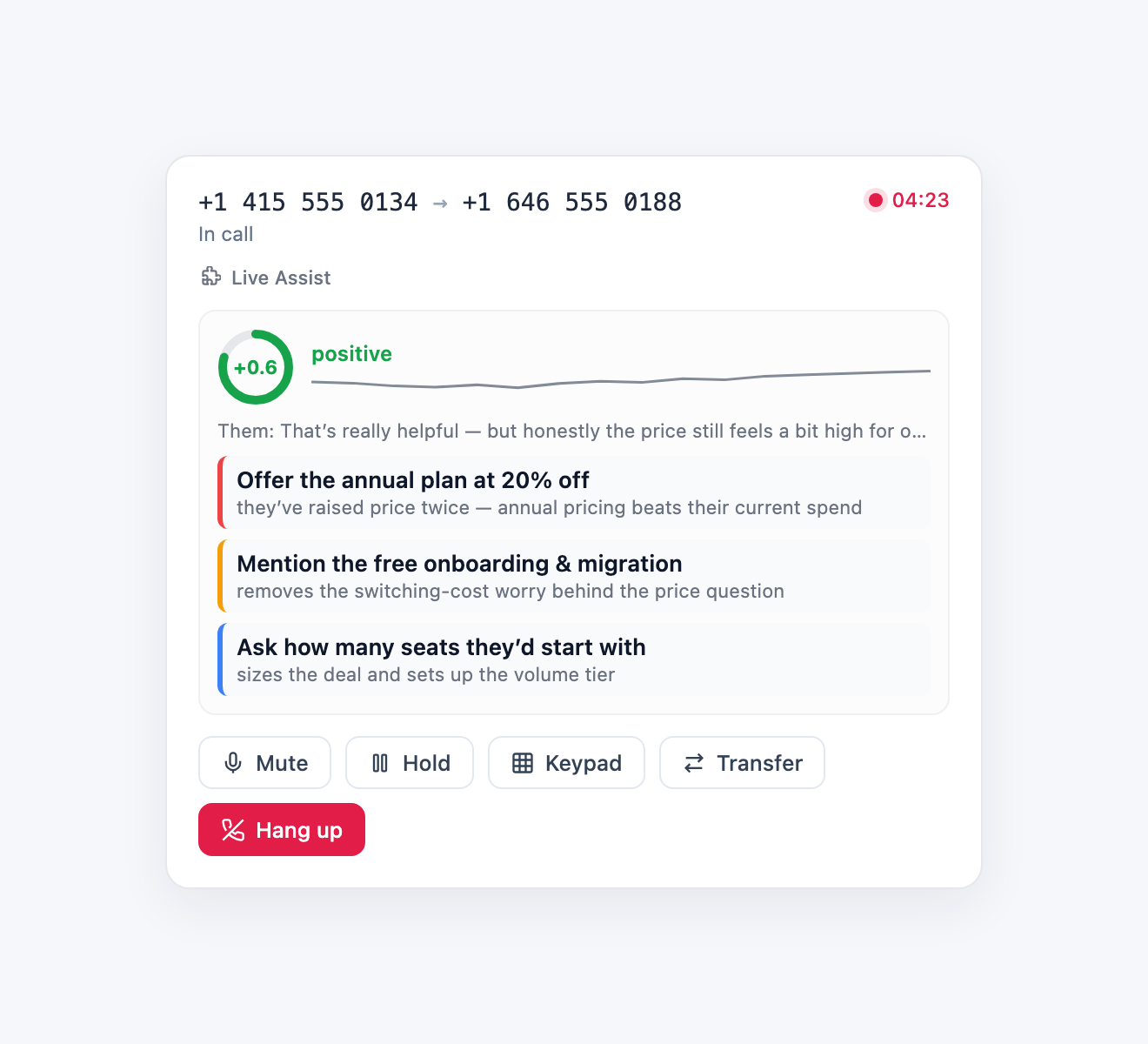
Real-time AI coaching for your reps on live softphone calls. While a rep talks to a customer from the Telenow softphone, Live Assist listens to both sides of the conversation and — turn by turn — shows a live customer sentiment gauge and KB-grounded coaching cards ("what to say next") right above the call controls.
It's an AI copilot for the human on the call, not a voice agent: the customer never hears anything, and the call itself is never touched. Everything is fail-open — if coaching can't run, the call simply continues without it.
What the rep sees during a call
- Sentiment gauge — a live score from −1 to +1 with a label (positive / neutral / negative) and a sparkline of how the customer's mood has moved across the call.
- Live transcript ticker — the last thing either side said, as it's said.
- Coaching cards — after each customer turn, one concrete next move ("Offer the annual plan — they asked about long-term pricing twice"), color-coded by urgency, grounded in the knowledge base you map to the rep.
How it works
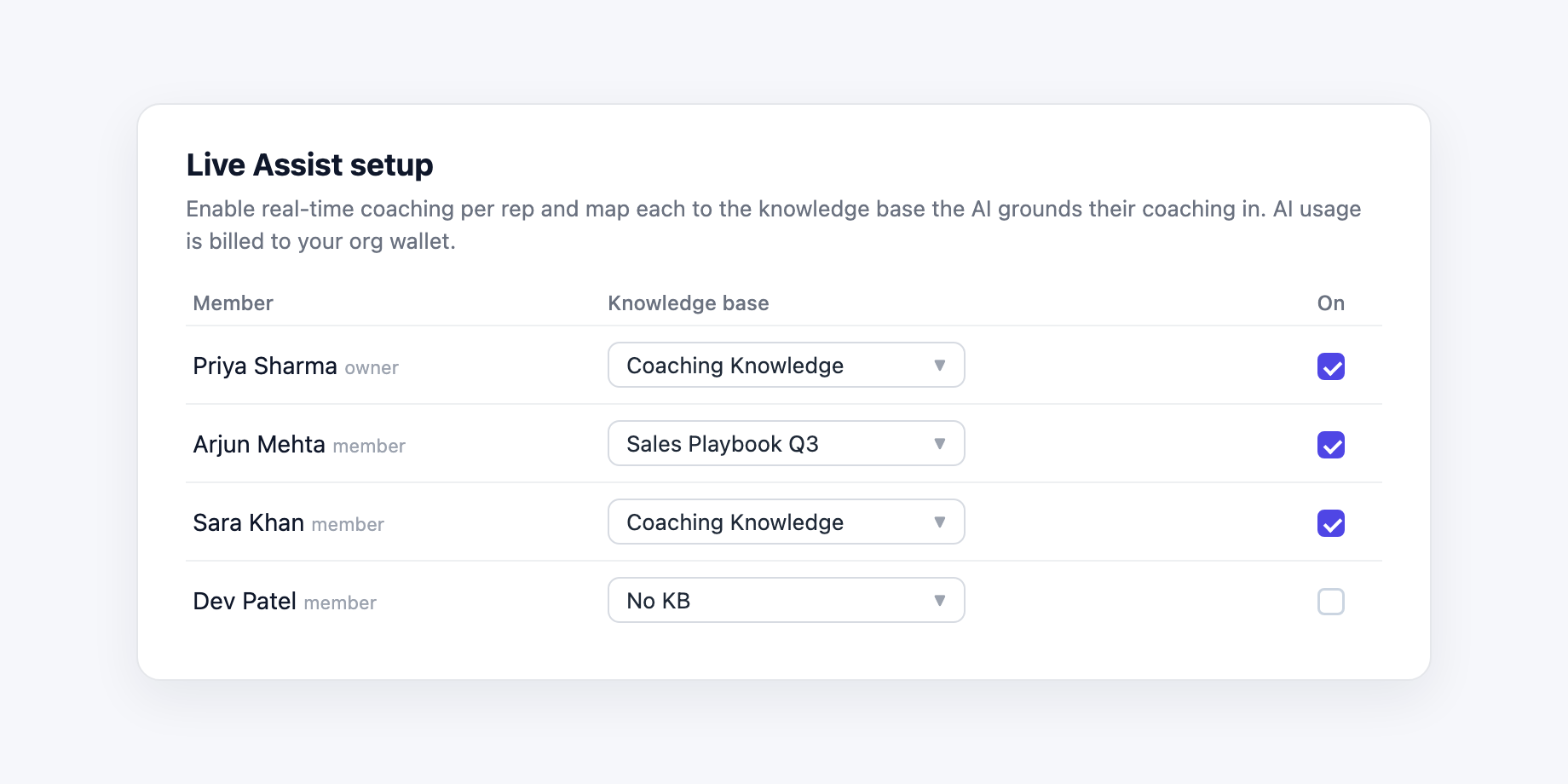
- An admin opens Live Assist setup, turns coaching on per rep, and
clicks Configure to set up how that rep is coached:
- Coaching context — what you sell, who the rep talks to, and what a win looks like; it's fed into every suggestion.
- Knowledge base — the playbook that grounds suggestions. The app ships a starter Coaching Knowledge KB you can replace with your own.
- AI model — a speed/quality tier (fast / balanced / smart) or any model from the platform catalog, each labelled with a speed hint.
- Transcription engine + language — the STT provider and model from the platform catalog (realtime engines; Deepgram by default) and the call language (auto-multilingual by default). Runs on platform keys — BYOK does not apply.
- When an enabled rep places or answers a softphone call, the widget subscribes to the call's transcript stream, then arms live transcription on both legs with the rep's language setting. A status chip on the panel shows connecting → armed → live; if transcription can't start, the reason is shown right there.
- On every customer turn it runs sentiment analysis and a playbook-grounded coaching prompt through the platform AI, and updates the gauge + cards in about one to two seconds. When the call ends the coached session (sentiment timeline + suggestions) is saved for the analytics page.
Pages
- Live Assist — the in-call panel itself, rendered above the softphone controls during a live call (only for reps an admin enabled).
- Live Assist setup — the per-member enable switch + knowledge-base mapping (admins).
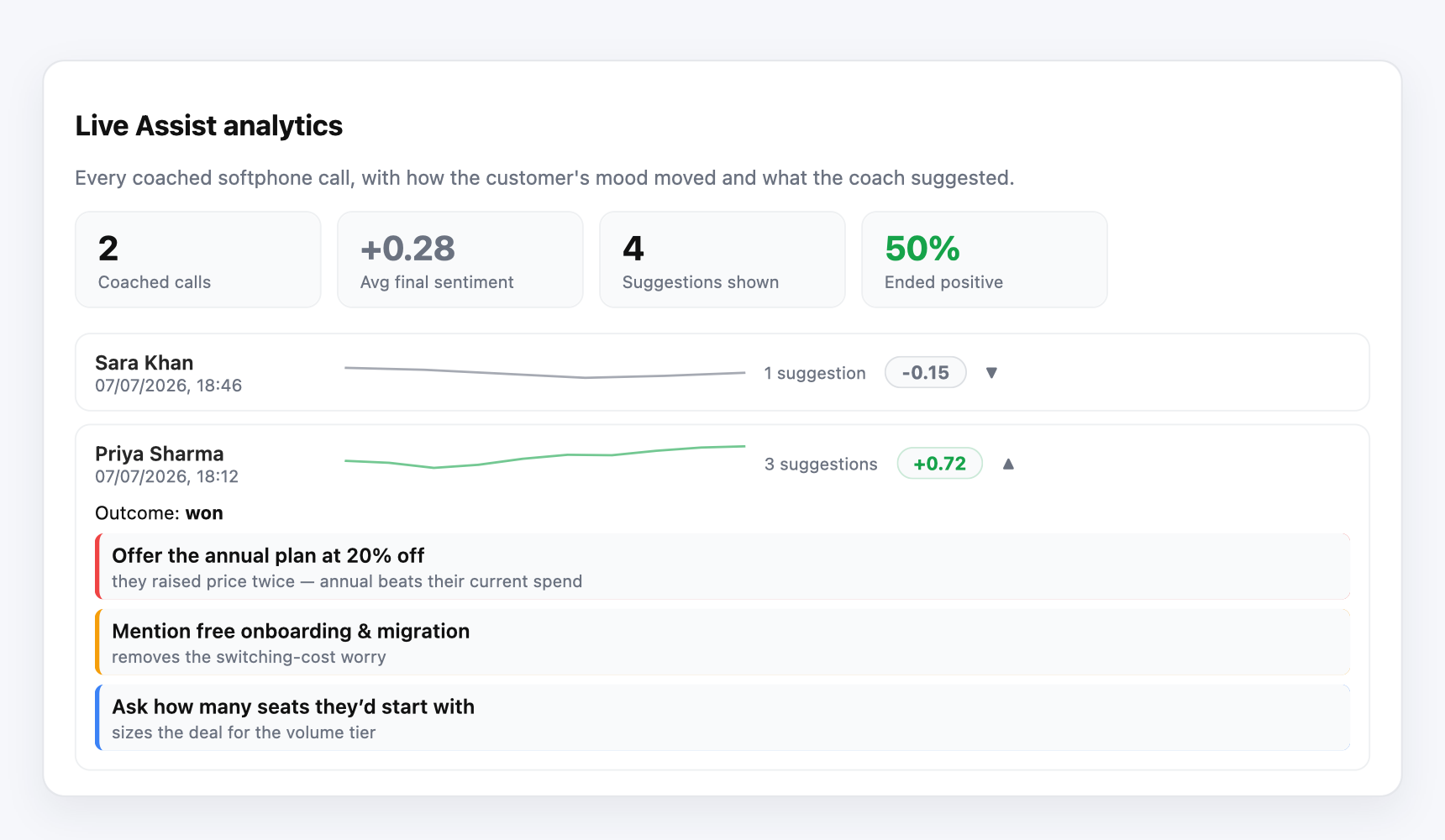
- Live Assist analytics — coached-call count and average final sentiment across coached calls.
Requirements & billing
- Calls must be placed from the Telenow dashboard softphone (that's where the panel renders).
- Coaching is off by default for every rep until an admin enables them in Live Assist setup.
- Live transcription and AI suggestions run on your org's Telenow account and are billed to your org wallet as usage (they appear on your billing breakdown as their own "App AI: Live Assist" line). Uninstalling or disabling a rep stops all spend from that rep's calls.
Privacy
- Transcripts are streamed to the widget for the duration of the call to drive the gauge and cards; the customer's words are treated strictly as data, never as instructions to the AI.
- The member roster shown in setup is read through the platform's members API and stays inside your org.
Install & try it
- Install the app and consent to the requested scopes.
- Open Live Assist setup, enable yourself, and open Configure to set your coaching context, model, and language (or keep the defaults and the bundled knowledge base).
- Place a softphone call — the panel appears above the call controls once the call is live, with a status chip showing when coaching goes live.
If the panel shows "couldn't start transcription", the platform's live-assist transcription tap isn't enabled for your environment — ask your platform operator to enable it, then call again.
Data it manages
Permissions it requests
Apps run inside your workspace under least-privilege scopes you can see up front. This app asks for:
calls:transcribe:livecalls:readai:llmkb:readmembers:readuser:profileobjects:coach_user_configobjects:coach_playbookobjects:coach_sessionWhat's new in v1.3.0
Changelog
1.3.0
- Real analytics page — no more single summary line. Stat tiles (coached calls, average final sentiment, suggestions shown, % ended positive) plus a per-call list: rep, time, the full sentiment curve for the call, final score, and an expandable view of every suggestion the coach gave (with urgency colors) and the call outcome.
1.2.0
- Analytics fixed — coached calls are now recorded reliably: the record is saved after every coached turn during the call (previously it was written only "at call end", which never ran because the panel is torn down the moment the call ends — so analytics always showed 0).
- Every catalog model in the AI picker — the model dropdown now lists all LLMs from your platform catalog with an honest speed hint per model (fast / moderate / slower · most capable), alongside the three auto tiers. If the catalog can't be loaded, the setup page says so instead of silently showing tiers only.
- Transcription engine picker — choose the STT provider and model from the platform catalog per rep (realtime/streaming engines only). Runs on platform keys and is billed to the org wallet — BYOK does not apply. Billing is metered against the engine that actually transcribed the call.
1.1.0
Per-rep setup + a coaching panel that tells you what's wrong instead of staying silent.
- Per-rep configuration in Live Assist setup (open Configure on a member): coaching context (product / audience / goals fed into every suggestion), AI model (fast / balanced / smart tier or an explicit catalog model), call language for transcription, and the knowledge base — all per rep.
- Visible status on the in-call panel: connecting → armed → live, with the actual error shown when transcription can't start (e.g. live assist disabled on the platform, wallet gate, missing scope) — previously the panel sat on "Listening…" forever with no clue.
- The panel now subscribes to the transcript stream before arming, so the first words of the call are never missed.
- Analytics now works: each coached call saves its sentiment timeline and suggestions when the call ends (previously nothing wrote coached-call records, so analytics always showed zero).
- Transcription language/model are passed through to the platform's live
transcription tap (new
calls.arm(sessionId, { language, sttModel })).
1.0.0
Initial release.
- In-call coaching panel above the softphone controls: live customer sentiment gauge (−1…+1) with sparkline, live transcript ticker, and KB-grounded coaching cards after every customer turn.
- Live Assist setup page: per-member enable switch + per-member knowledge-base mapping (admins).
- Live Assist analytics page: coached-call count and average final sentiment.
- Ships a starter Coaching Knowledge knowledge base to ground suggestions in — add your own product facts and objection-handling material.
- Fail-open by design: coaching can never affect the call itself.
- AI + live-transcription usage is billed to the org wallet and shows up as its own "App AI: Live Assist" line on the billing breakdown.
Publisher
Marketplace publisher · app reviewed by Telenow before listing.
Your data, your keys
Secrets, carrier credentials and API keys stored AES-GCM encrypted; TLS in transit; HMAC-signed webhooks.
Strict per-organization data isolation with role-based access for every member.
Every mutating action is logged and filterable, with CSV export for your records.
In-app DLT / regulatory flows, TCPA calling windows, and org-wide Do-Not-Call enforcement.
Install Live Assist
Sign up free and get ₹300.00 in credit — no card required. Connect your number, pick a template, and go live in minutes.