Hospital Appointments
Phone appointment booking for a hospital. The AI receptionist looks callers up by number, then books, reschedules or cancels against real availability — and every change lands in the CRM straight away.
Reviewed & approved · install free · connect your tools
Last updated 2026-08-03
Screenshots
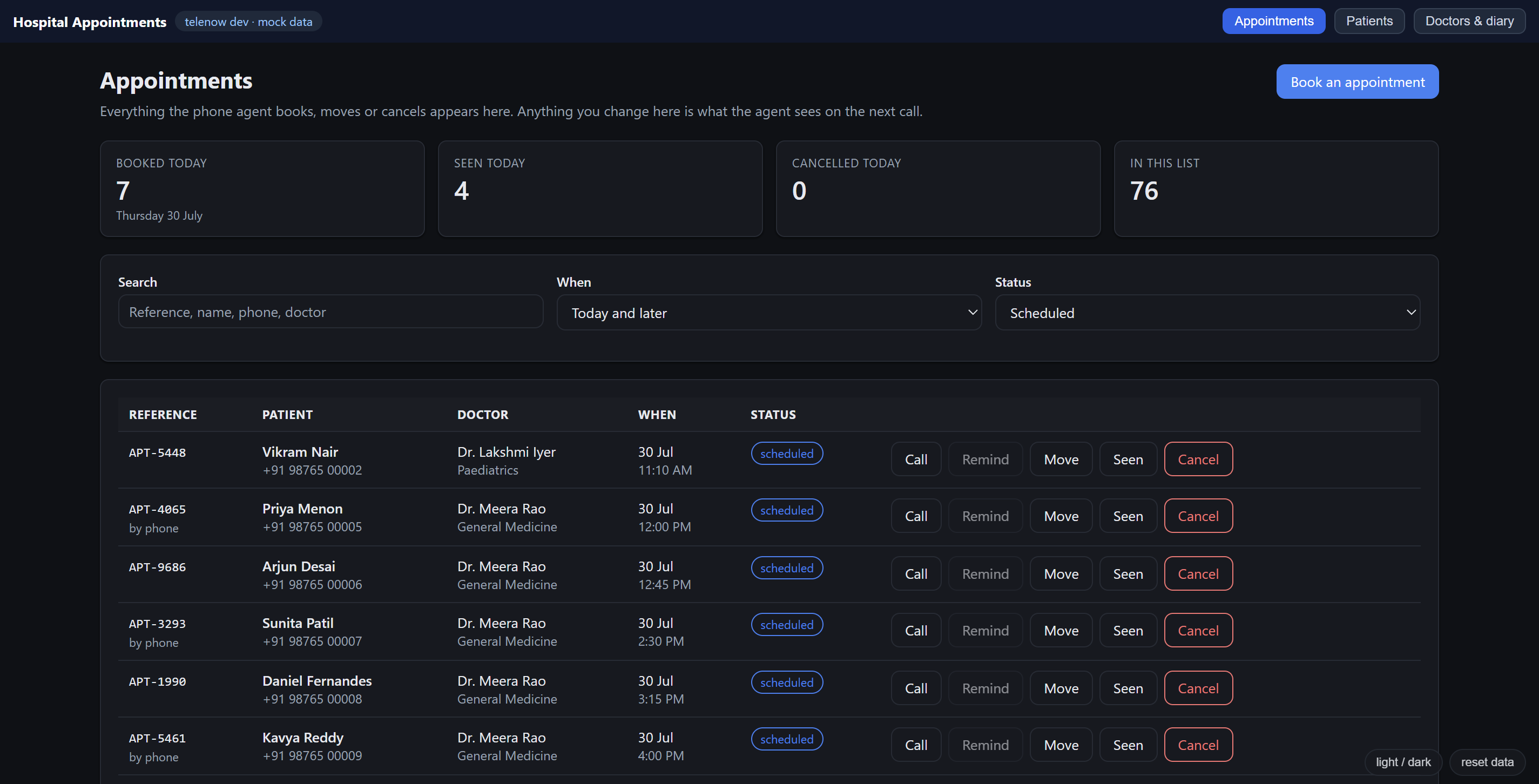
About Hospital Appointments
Hospital Appointments
Phone appointment booking for a hospital, on the Telenow app platform.
One AI receptionist answers the line, looks the caller up by number, and books, reschedules or cancels against real availability — in Hindi or English, whichever the caller speaks, though the CRM itself is always written in English underneath. Every change lands in the CRM immediately. A second, outbound agent can call a patient back about one specific appointment. A small three-page dashboard sits behind it for reception staff.
Zero hosting. Every tool is a declarative handler running on Telenow's own runtime — there is no server to deploy and nothing that can be down at 2am.
What it is
| 5 objects | doctor, patient, slot, appointment, department |
| 9 tools | the ones the agent calls mid-call |
| 2 agents | the inbound receptionist — 18 nodes, 49 edges — and an outbound reminder caller (AGENT.md) |
| 3 pages | Appointments · Patients · Doctors & diary |
| 1 workflow | marks a slot booked the moment an appointment is created |
| 8 scopes | five objects:*, agents:read, calls:initiate, softphone:dial |
The call
"May I have your mobile number?"
        │
   find_patient(phone)  +  find_appointment(phone, scheduled)
        │
   ┌────┴──────────────────┬──────────────────────────┐
   │ known, has a booking  │ known, nothing booked    │ not on the system
   │                       │                          │
   ├─ book another ──┐     │ "Hello Asha — I can see  ├─ name, DOB, region
   ├─ reschedule ────┤     │  you last saw Dr Rao"    │
   ├─ cancel         │     │                          │
   └─ hear details   │     │ (no re-registration)     │
                     ▼     ▼                          ▼
              list_doctors  →  find_available_slots
                     │                │
              clash? offer alternatives, or change doctor
                     │
              read the summary back → explicit yes
                     │
              create_patient (if new) + book_appointment
                     │
              read back the reference → CRM updated
The 9 tools
| Tool | Handler | What it does |
|---|---|---|
find_patient | object.query | Who is calling, and their visit history. Called first, every call. |
find_appointment | object.query | What they have booked. Called alongside find_patient. |
get_appointment | object.query | Fetch one booking by its reference. |
list_doctors | object.query | The only source of doctors the agent may name. |
find_available_slots | object.query | The only source of times. Never promises before checking. |
create_patient | object.create | Only for callers with no record, and only at confirmation. |
book_appointment | object.create | Writes the booking. Fires the slot-locking workflow. |
reschedule_appointment | object.update | Same reference, new time. Matches on ref. |
cancel_appointment | object.update | Only after an explicit yes. Matches on ref. |
Call-back: a human dial-out, and a second AI agent
The Patients and Appointments pages both carry two buttons per row:
- Call opens the dashboard's own softphone, prefilled with the patient's number, for a hospital staff member to dial themselves. Needs the
softphone:dialscope. - Remind places a real outbound call from the Hospital Reminder Caller agent (
manifest/reminder-agent.mjs) — it reads the patient their appointment and can reschedule or cancel it right there, using the exact samereschedule_appointment/cancel_appointmenttools as the receptionist. Needs thecalls:initiatescope, and the agent to have been built once from the Doctors page.
Both are genuine platform capabilities (telenow.softphone.dial / telenow.calls.initiate), not a "callback requested" flag — see AGENT.md for how the reminder-caller flow is put together and why it reuses reschedule_appointment for a post-cancel rebook rather than a second booking path.
Design decisions worth knowing
Availability is materialised, not calculated. A voice agent has no compute — object.query filters by equality on declared fields, returns 50 rows, and cannot sort. So "what's free on Tuesday with Dr Rao?" can only be answered deterministically if the answer already exists as rows. Each doctor's working pattern is expanded into slot rows, and find_available_slots becomes a lookup.
The cost, stated plainly: the diary is only as fresh as the last time the CRM was opened. Two things keep that honest. Past slots are expired on load, so a stale diary returns nothing rather than yesterday's times — failing closed beats an agent offering an appointment that already happened. And the Doctors page shows exactly how much diary is left.
Booking is automated; cancelling is reconciled. Only a CREATE fires object.<type>.created on this platform — a PATCH and a DELETE fire nothing at all. So booking locks its slot via a workflow, instantly and server-side. Cancelling and rescheduling are updates, so no workflow can see them; the CRM frees those slots when it loads (reconcileSlots in ui/lib/slots.ts). Anyone opening the CRM fixes it for everyone, and genuine double-bookings are surfaced rather than silently resolved.
The caller is looked up as a person, not just as a booking. find_patient and find_appointment are separate calls because a patient seen last year with nothing booked has no appointment to find — but is very much an existing patient. Searching appointments alone would ask them for their name and date of birth all over again and create a second record for them, splitting their history and making the next lookup ambiguous. Visit history lives denormalised on the patient row (last_visit_date, last_doctor_name, visit_count) because object.query cannot sort, count or aggregate: the agent has no way to work out "when did I last come in?" from raw appointment rows mid-call, so the answer is written when it changes and simply read back.
The booking reference is pre-minted on the slot. An LLM asked to invent a unique code will collide with an existing one eventually, and two patients sharing a reference is unrecoverable over the phone. Every slot carries a booking_code; the agent copies it onto the appointment as ref.
Never use window.confirm / window.prompt / window.alert in this app. The dashboard renders every app inside a sandboxed iframe, and native browser dialogs are blocked there unless the sandbox carries allow-modals — which it does not. The failure is silent: confirm() returns false and prompt() returns null without showing anything, so if (!confirm(...)) return simply never proceeds and the button looks dead. Worse, it works under npm run dev, because the harness runs top-level rather than in an iframe — so this class of bug survives local testing completely. Use useConfirm() from ui/components/ui.tsx instead; it renders a real in-page dialog and supports an optional text field for things like a cancellation reason.
The agent writes the country code, because nothing downstream can. Patients say ten digits and should never be asked for a +91. But the agent's tools are declarative object.create / object.query handlers: the runtime stores exactly what the model sends and matches by exact string equality, with no normalisation step anywhere. A patient registered as 9876500001 is therefore invisible to the next lookup for +919876500001. So the agent is told — in the standing rules, on the greet node, and on every phone parameter it fills — to write every number as exactly +91 plus the ten digits, and nothing else. One form with zero branches, because a rule with an exception ("keep a foreign code if they said one") is a branch the model will eventually take wrongly mid-call. Because an instruction is not a guarantee, healPhoneNumbers in ui/lib/heal.ts rewrites anything already stored the wrong way when the CRM loads, patients and appointments together so the two never come unlinked.
The CRM never stores Hindi, even though the agent speaks it. A caller may talk in Hindi, English, or a mix, and the agent mirrors whichever they use. But every value written into a tool call — a name, a region, a reason — is translated into English first, and the same rule applies to searching: the agent translates what it heard before calling find_patient, rather than matching on the caller's own words. This is what stops the obvious failure mode of an agent that stores a name in Devanagari and then can't find that same patient on the next call because it's now searching in English. doctor.department gets the analogous fix on the CRM side: it is picked from a managed catalog (the department object) rather than typed free text, so it can't drift into two spellings of the same department across doctors.
Testing the UI without a dashboard
npm run dev
A working hospital at http://localhost:5174 — no Telenow account, no install, no phone number. Four doctors, a fortnight of diary, ~126 appointments, all dated from the day you run it. That is why telenow.dev.json is generated rather than committed: a static fixture is correct for one day and then shows an empty hospital, which reads as a bug in the app.
The harness adds three things createMockBridge does not provide:
- The design system.
--tn-*variables and.tn-*classes are injected by the dashboard; standalone the CRM would render as unstyled HTML. A faithful stand-in plus a light/dark toggle. Treat colour and spacing as approximate and confirm in Dev preview. - Realtime. The mock's
data.subscribeis a no-op, so nothing re-lists after a write and the UI looks frozen. - Fixture sync. The mock seeds localStorage once and ignores the file forever after. A stamp makes
npm run mocktake effect automatically.
Bottom-right: light / dark, and reset data.
telenow devreadstelenow.dev.jsononce, at startup, and embeds it in the page. So runningnpm run mockwhile the server is up changes nothing on screen — restart the dev server to pick up new fixtures.npm run devdoes both in the right order.
None of this ships.
npm run devgenerates a manifest whoseui.entrypoints atui/dev/index.tsx;npm run buildalways regenerates with the real entry. Excluded by construction, not guarded by a runtime flag.
For real data use the dashboard's Dev preview and paste the localhost URL — but every bridge call there is a real write against the installing organisation, so use a test org.
Development
npm run manifest    # compose telenow.app.json from manifest/ and lint it
npm run mock        # regenerate telenow.dev.json, dated from today
npm test            # 46 mutation tests proving the linter catches real bugs
npm run typecheck   # tsc over the UI
npm run dev         # standalone hospital with mock data
npm run build       # validate, bundle, zip
The linter in scripts/lint-manifest.mjs is deliberately stricter than telenow validate, which checks only a subset. Every rule targets a failure mode that passes validation, uploads cleanly, and then breaks silently on a live call — a flow whose start node does not exist (the agent quietly degrades to single-context), an equation edge missing its {} braces (parses false, never fires), an object.update matching an undeclared field, an icon off the whitelist. npm test corrupts the manifest 46 ways and asserts each rule fires, because a linter nobody has seen fail is indistinguishable from one that returns nothing.
manifest/
  index.mjs         app id, scopes, assembly
  objects.mjs       the 5 objects
  tools.mjs         the 9 tools
  agent.mjs         the receptionist's flow graph + SHARED_PATIENT_RULES
  reminder-agent.mjs  the outbound reminder caller's flow graph
  automation.mjs    the slot-locking workflow
  settings.mjs      per-install settings
  ui.mjs            the 3 pages
ui/
  pages/            Appointments · Patients · Doctors
  lib/slots.ts      generate, expire, reconcile
  lib/heal.ts       rewrite non-canonical phone numbers on load
  dev/              harness — never bundled into a release
scripts/
  build-manifest.mjs · build-fixtures.mjs · lint-manifest.mjs · lint.test.mjs
Changing the app id (it is global and first-come, so upload can 409):
npm run set-app-id -- your-new-id
Do not edit it by hand — the id also appears inside flow tool nodes, and a mismatch means the node is silently stripped at install.
Ready-made agents it ships
Answers the hospital appointment line. Looks the caller up by phone number, then books, reschedules or cancels — checking real availability before offering any time, and writing every change straight to the CRM.
Calls a patient back about one specific appointment (triggered from the Patients or Appointments page) — reads it out, and can reschedule or cancel it right there on the call.
What your agents can do with it
Look up who is calling, by their mobile number. Call this at the very start of every call, together with find_appointment. If a record comes back, greet them by their first name and DO NOT ask for their name, date of birth or region again — you already have them. The record also tells you when they last came in and which doctor they saw, which you may mention. If nothing comes back they are new to the hospital and you will need to register them. Never read a date of birth out loud; ask them for it if you need to check it. If you pass a name, it must be in English (translated, not transliterated) even if the caller spoke Hindi — the CRM never stores Hindi, so a Hindi-script name will not match an existing record.
Look up a caller's appointments by their mobile number. Call this at the start of every call, alongside find_patient. Pass status "scheduled" to see what they have COMING UP — that is what you almost always want, and it stops you reading out an appointment that has already happened as though it were still to come. Leave status out only when the caller asks about a past visit. If results is empty they have nothing booked. Never describe an appointment you did not get from this tool. The phone number is the only match key — it does not need translating, but any name you mention alongside it in conversation still must be in English, never Hindi script.
Fetch a single appointment by its booking reference, for when the caller quotes one such as "APT-4821", or when you need to re-read the exact details of a booking before changing it. Prefer find_appointment when you only have a phone number.
List the doctors the caller can be booked with. Call this before offering any doctor by name — you may only ever mention a doctor that came back from this tool. Use it when the caller asks who is available, names a department such as Cardiology or Paediatrics, or has no preference and needs options. Read back the title, name and department. Never read the doctor_code out loud.
Get the genuinely free appointment times for a doctor. You MUST call this before offering or confirming any time — never promise a slot you have not checked. Pass doctor_code plus either date as YYYY-MM-DD, or day_bucket if the caller was vague. Each result carries date_label and time_label already written out for speech: read those, never the raw timestamp and never the slot_ref. Offer at most three times at once. If results is empty, that day is fully booked — say so plainly and offer another day, or offer to try a different doctor.
Create a record for a caller who has no appointment history. Call this ONCE, only after you have collected and read back their full name, date of birth and region, and only if find_appointment returned nothing. Do not call it for a caller who already has appointments — they are already registered. Name and region must be in English even if the caller spoke Hindi — translate what they said, never write Devanagari script or a phonetic transliteration into this tool.
Book an appointment into a slot. Only call this after the caller has explicitly confirmed the summary back to you. Copy ref, slot_ref, date, date_label, weekday, time_label, start_iso, day_bucket, doctor_code, doctor_name and department STRAIGHT from the slot you offered — do not retype, reformat or invent any of them, and never make up a booking reference. When it succeeds, read the ref back slowly as their booking reference, along with the doctor, day and time. patient_name and reason must be in English even if the caller spoke Hindi — translate, never transliterate into Hindi script.
Move an existing appointment to a different time, keeping the same booking reference. The order is always: find_appointment to get the ref, then find_available_slots for the new time, then the caller confirms, then this tool. Copy every field from the NEW slot exactly. Never use this to create a second booking — use book_appointment for that. After it succeeds, read back the new doctor, day and time and confirm the reference has not changed.
Cancel a booking. Before calling this you MUST read the doctor, day and time back to the caller and get an explicit yes — cancelling the wrong appointment is a serious error. Ask why they are cancelling and pass it as cancel_reason. After it succeeds, confirm the cancellation and offer to book another time.
Data it manages
Permissions it requests
Apps run inside your workspace under least-privilege scopes you can see up front. This app asks for:
objects:departmentobjects:doctorobjects:patientobjects:slotobjects:appointmentobjects:configagents:readcalls:initiatesoftphone:dialPublisher
Marketplace publisher · app reviewed by Telenow before listing.
Your data, your keys
Apps run inside your own workspace under least-privilege scopes. Telenow is the control plane — the AI, telephony and data stay on accounts you own.
Secrets, carrier credentials and API keys stored AES-GCM encrypted; TLS in transit; HMAC-signed webhooks.
Strict per-organization data isolation with role-based access for every member.
Every mutating action is logged and filterable, with CSV export for your records.
In-app carrier applications (A2P 10DLC, regulatory bundles, India business KYC), TCPA calling windows, and org-wide Do-Not-Call enforcement.
More healthcare apps
Confirm appointments by call and automatically rebook a cancellation from your waitlist before the slot goes cold.
Install Hospital Appointments
Sign up free and get $1.00 in credit — no card required. Connect your number, pick a template, and go live in minutes.