
Maintenance Triage & Dispatch
24/7 maintenance triage — classify life-safety vs cosmetic on the call and dispatch the right vendor.
Last updated 2026-07-12
Screenshots
About Maintenance Triage & Dispatch
Maintenance Triage & Dispatch
24/7 maintenance triage that tells a gas leak from a squeaky hinge — on the call. It logs the work order, dispatches the on-call vendor for life-safety, and schedules the rest.
Built on the Telenow App Platform as a pure declarative app: the data model, the agent tools, the PMS unit hook, the confirmation workflow, the inbound triage agent, and the escalation knowledge base all run on-platform. No external server.
Maintenance Triage & Dispatch is an inbound-first app — you point your published 24/7 maintenance number at the bundled agent, and every tenant call is answered, classified, logged, and routed automatically, around the clock.
The problem (and the number)
Most property managers hand after-hours calls to an answering service that only takes a message — a note that a human reads hours later. That is exactly when the costly calls come in. A misrouted emergency is the biggest liability a manager carries: a gas leak, an active flood, sewage backup, or no heat in freezing weather left to sit overnight turns a same-day fix into a habitability claim, water damage across multiple units, and an emergency vendor call-out at a steep after-hours premium. Meanwhile genuinely cosmetic requests get dispatched at emergency rates because nobody triaged them. Industry maintenance data consistently puts emergency / after-hours call-outs at 2–3× the cost of a scheduled visit, and water damage alone is one of the largest single sources of property-insurance loss.
Maintenance Triage & Dispatch answers on the first ring, decides life-safety vs urgent vs cosmetic against a written escalation policy, and acts on it immediately — dispatch the on-call vendor and transfer for an emergency, schedule the right trade for everything else.
How it works
Tenant calls the 24/7 maintenance number
        │
        ▼
Maintenance Triage Agent (inbound, deterministic flow)
  greet + gather (unit, issue, access)  ──►  find_unit  (confirm property/address)
        │
        ▼
  classify  (extract → category, grounded in the escalation KB)
        │
        ├─ life_safety ─►  create_work_order ─► dispatch_emergency (status: dispatched)
        │                                        └─► TRANSFER to {{settings.oncall_number}}
        │
        └─ urgent / cosmetic ─►  create_work_order ─► schedule_routine (status: scheduled)
        │
        ▼
  object.work_order.created  ─►  dispatch_confirm workflow
                                 └─ send-message {{settings.wa_channel}} → tenant confirmation

  Unit roster kept fresh out-of-band:  PMS  ──(unit webhook)──►  pms_units hook ──► unit (dedupe on unit_no)
Everything the agent does on the call updates the same work_order rows you see on the dashboard — and the dashboard's Call now button dials the tenant back through the same agent and tools.
Agent tools (used mid-call — all declarative)
| Tool | Does | Handler |
|---|---|---|
find_unit | Confirm the caller's property & address by unit number | object.query unit |
create_work_order | Log the maintenance issue, its category, and access details | object.create work_order |
classify_order | Set / correct the triage category on the open order | object.update work_order (match phone) |
dispatch_emergency | Life-safety — dispatch on-call now | object.update work_order (match phone → status dispatched) |
schedule_routine | Urgent / cosmetic — schedule the right trade | object.update work_order (match phone → status scheduled) |
resolve_order | Close the order once fixed | object.update work_order (match phone → status resolved) |
The bundled Maintenance Triage Agent is a deterministic multi-context flow: greet & gather → a find_unit tool node → an extract classify node → an equation branch that either dispatches + transfers a life-safety emergency or schedules a routine job. STT/TTS default to Deepgram + ElevenLabs (English).
Dashboard pages
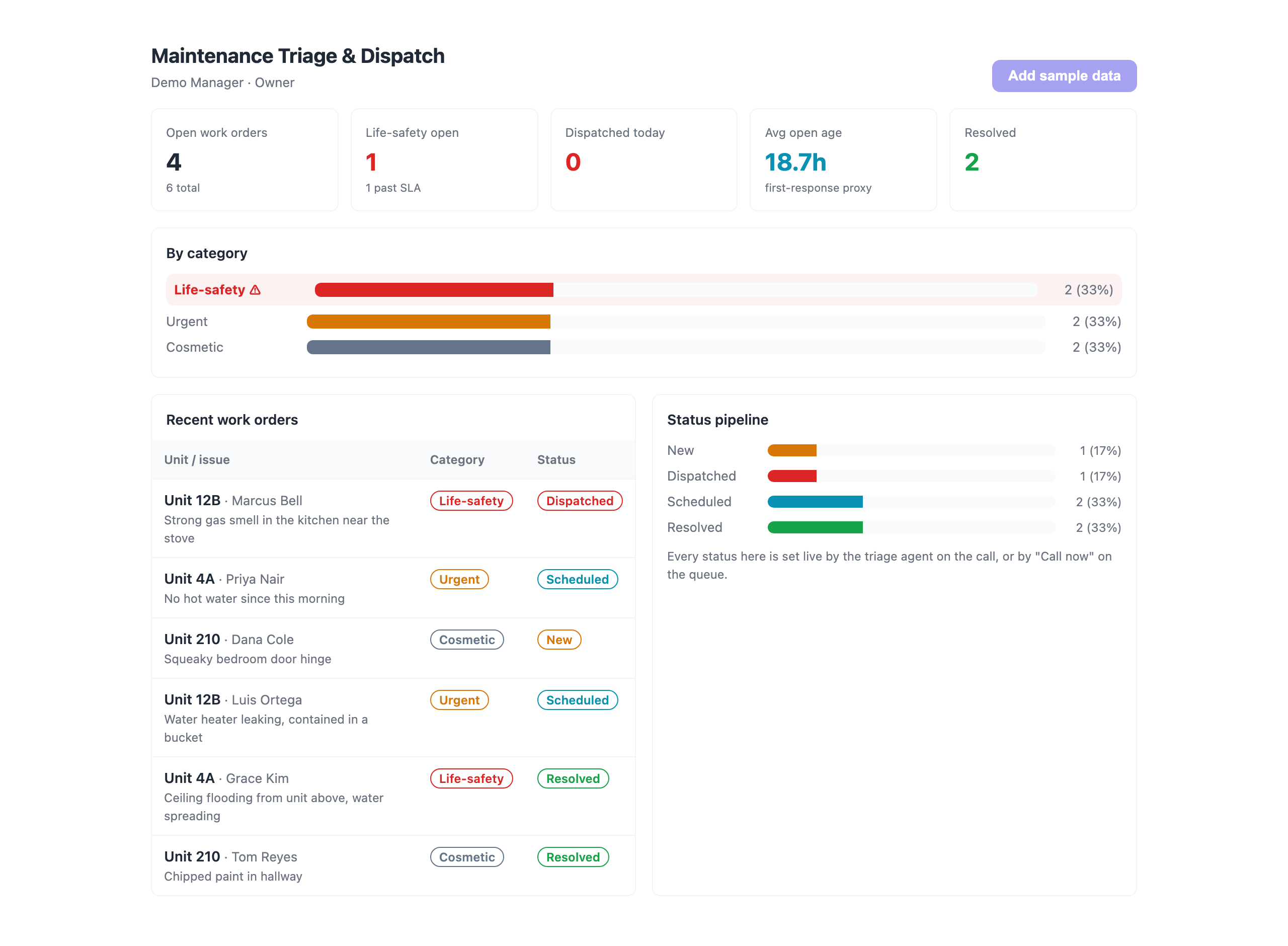
- Maintenance Triage & Dispatch (dashboard) — KPI tiles (open work orders, life-safety open with an SLA-at-risk flag, dispatched today, average open age as a first-response proxy, resolved), a by-category breakdown with life-safety highlighted, a status pipeline, and recent work orders. Also powers the platform
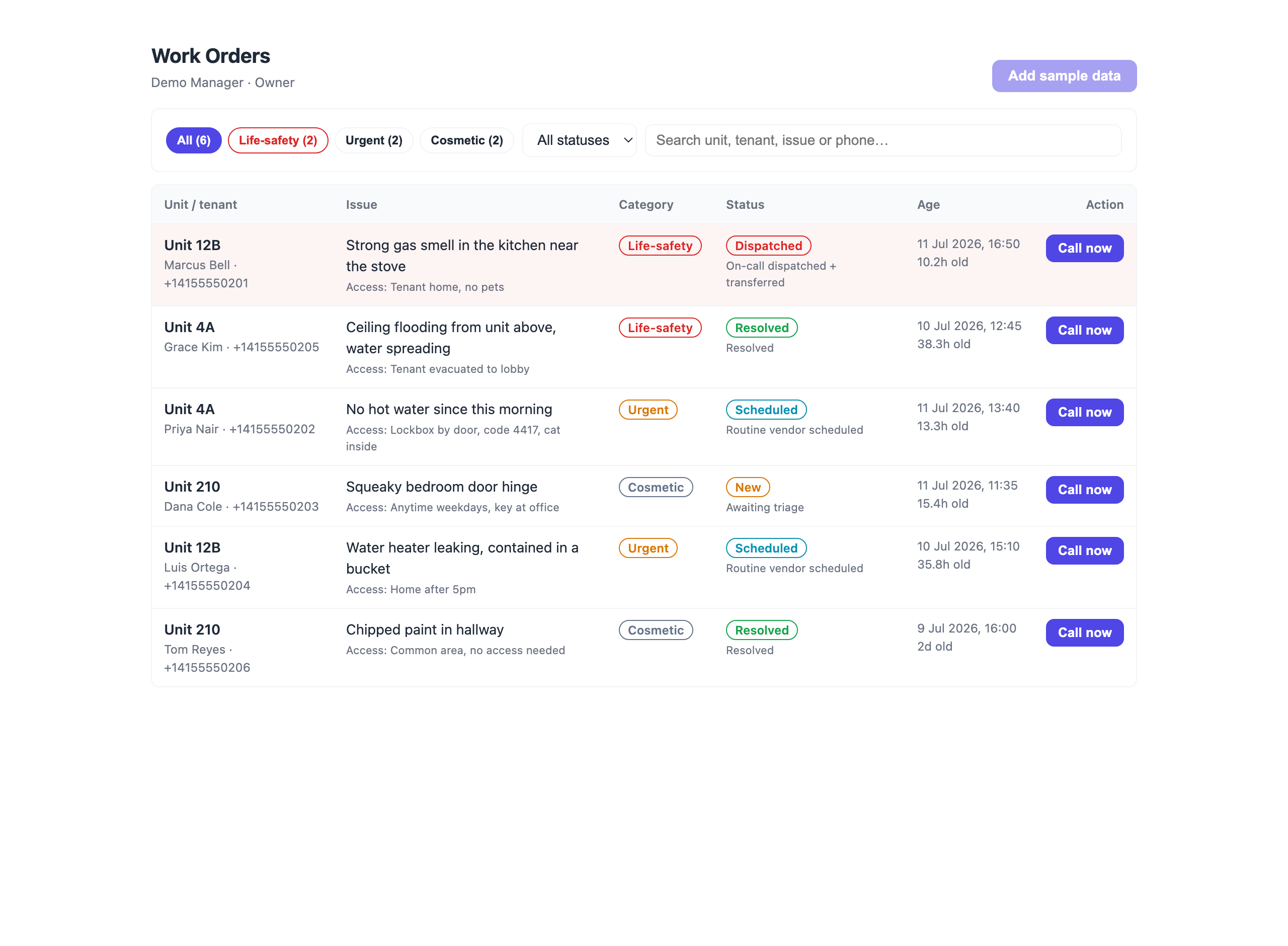
dashboard_widgetslot in a compact form. - Work Orders — the live queue with category + status badges and a plain-language triage outcome per row; filter by category/status, search, and Call now to call a tenant back through the triage agent (passes unit/issue/category context variables). Life-safety orders sort to the top and are highlighted.
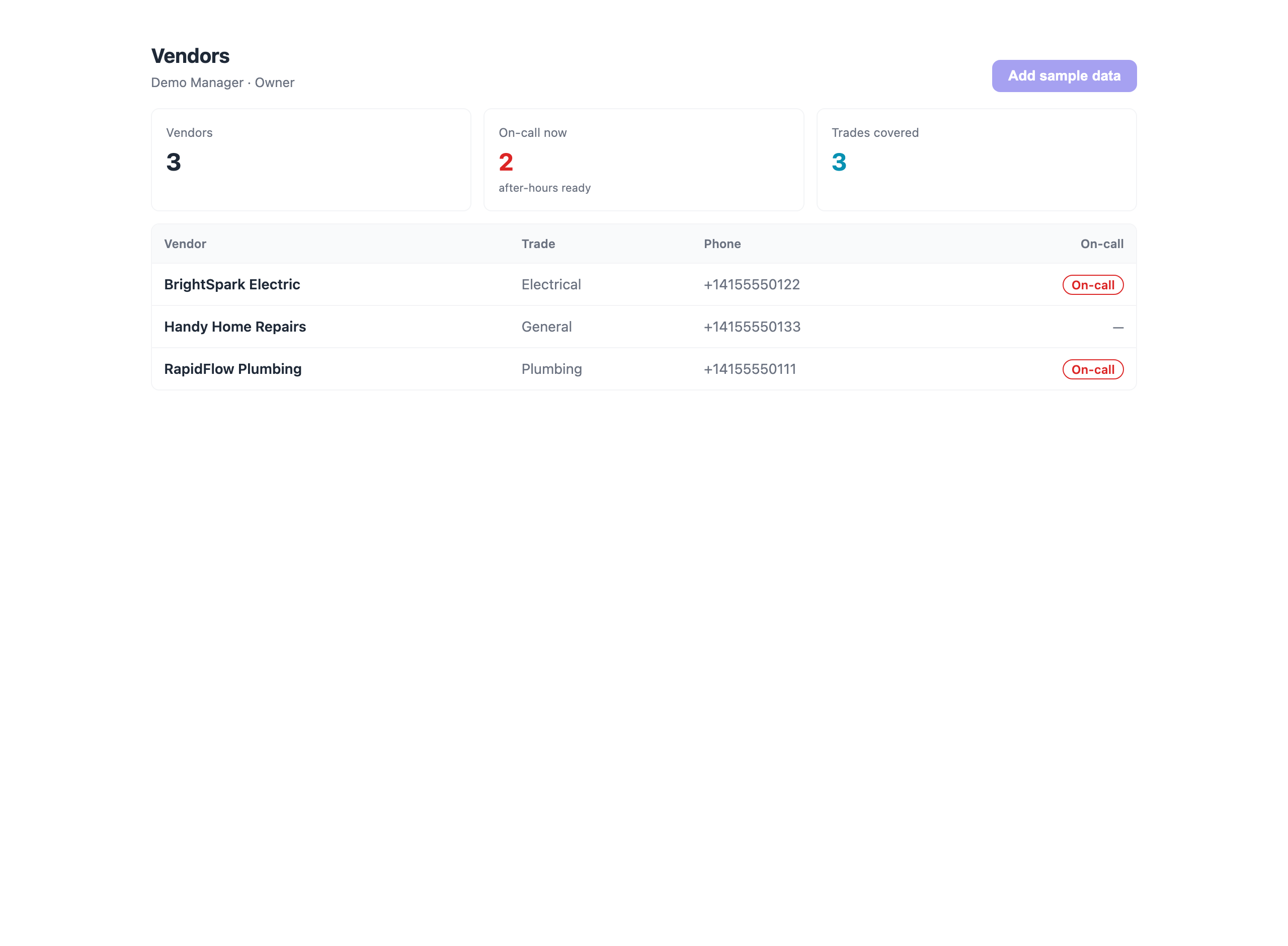
- Vendors — your trade roster with an on-call indicator (plumbing, electrical, HVAC, general…).
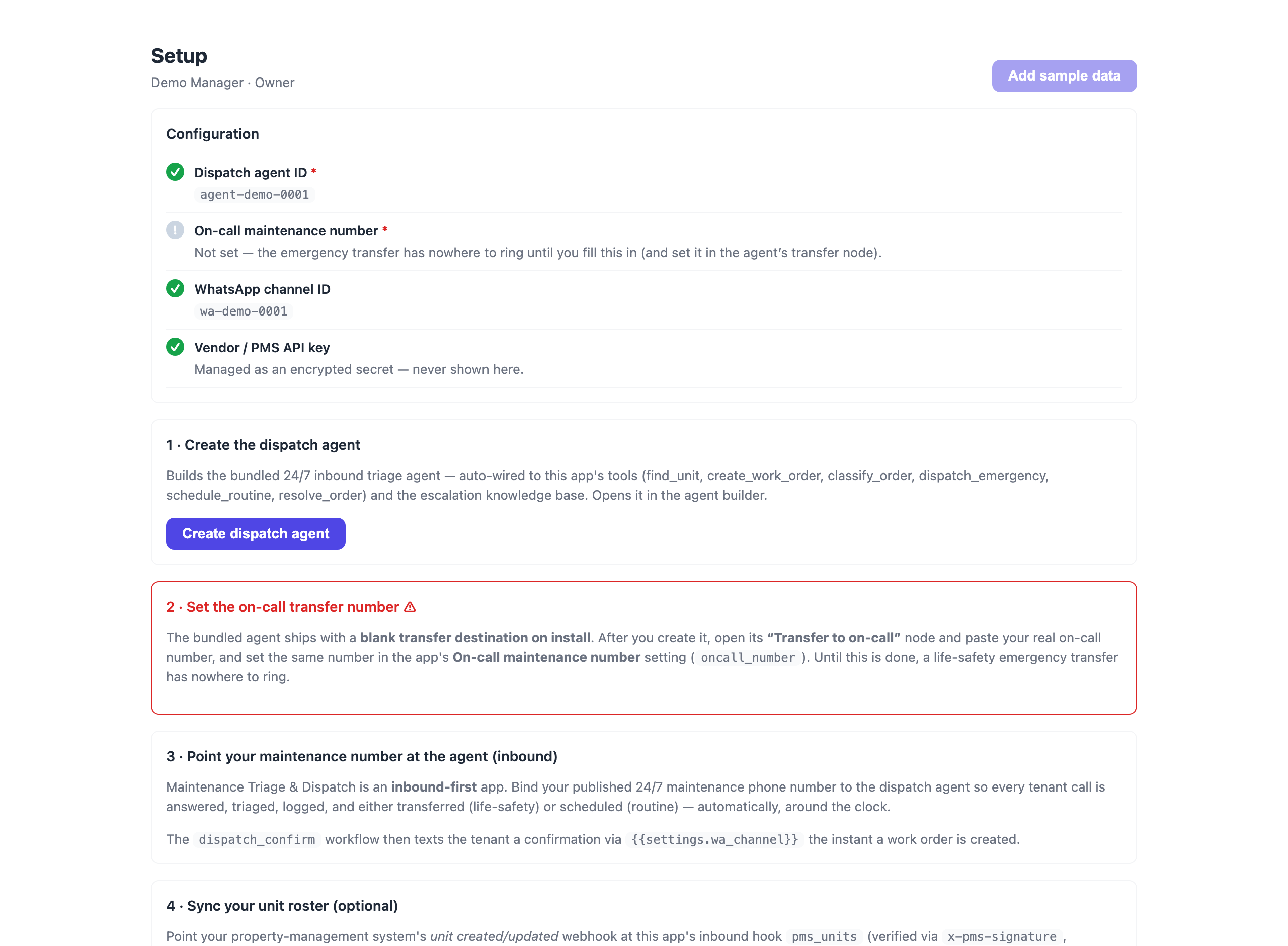
- Setup — a configuration checklist, one-click Create dispatch agent, the on-call transfer-number caveat, and the inbound-number + PMS wiring steps.
Knowledge base
escalation-policy ships four real documents the agent classifies against: life-safety emergencies — dispatch now, urgent vs cosmetic — how to tell them apart, vendor dispatch policy, and tenant safety script & access details.
Install & post-install wiring
- Install Maintenance Triage & Dispatch into your org.
- Open Setup → Create dispatch agent (builds the bundled inbound agent, auto-wired to the tools + KB).
- Copy the new agent's ID into the app's Dispatch agent ID setting (
dispatch_agent_id). - Set the on-call transfer number. The agent ships with a blank transfer destination on install — open its “Transfer to on-call” node and paste your real on-call number, and set the same number in the On-call maintenance number setting (
oncall_number). Until this is done, a life-safety emergency transfer has nowhere to ring. - Bind your 24/7 maintenance phone number to the dispatch agent so every tenant call is answered and triaged (this is an inbound app).
- (Optional) Set WhatsApp channel ID (
wa_channel) sodispatch_confirmtexts tenants a confirmation the moment a work order is logged. - (Optional) Point your PMS unit created/updated webhook at the
pms_unitsinbound hook (verified withx-pms-signature, deduped onunit_no) to keep the unit roster fresh.
Settings
| Key | Type | Notes |
|---|---|---|
dispatch_agent_id | text (required) | The inbound triage agent; also used by "Call now". |
oncall_number | text | On-call destination for life-safety transfers. Also paste it into the agent's transfer node (blank on install). |
wa_channel | text | WhatsApp channel for the tenant confirmation. |
vendor_api_key | secret | Optional PMS / vendor-network key (encrypted; server-side only). |
Bulk dialing your backlog
The real-time path (inbound call → triage → dispatch/schedule) covers live calls. To sweep a backlog of open work orders with outbound follow-up calls, use the app-key campaign API:
POST /api/app-campaigns
{ "agentId": "<dispatch agent id>",
  "targetQuery": { "status": "new" },      // over the `work_order` object
  "result": { ... write-back ... } }
Monetization
Maintenance Triage & Dispatch is billed per unit, per month — a flat rate for every occupied unit under 24/7 coverage, regardless of call volume. That maps cleanly to how property managers already budget maintenance, scales with the portfolio, and is trivially cheaper than a single misrouted after-hours emergency. The dashboard surfaces the value directly: emergencies dispatched on time, routine jobs kept off emergency rates, and average first-response age per unit.
Ready-made agents it ships
A 24/7 inbound agent that answers the maintenance line, classifies every issue as life-safety, urgent, or cosmetic against the escalation policy, logs a work order, and either transfers a life-safety emergency straight to the on-call vendor or schedules the routine job with the right trade.
What your agents can do with it
Look up a unit by its number to confirm the property and street address before logging a work order.
Log a new maintenance work order for the caller's unit with the issue, its triage category, and how a vendor can access the unit.
Set or correct the triage category (life_safety / urgent / cosmetic) on the caller's open work order.
Dispatch the on-call vendor NOW for a life-safety emergency and mark the caller's work order as dispatched.
Schedule a routine (urgent or cosmetic) work order with the right-trade vendor and mark the caller's order as scheduled.
Mark the caller's work order as resolved once the issue has been fixed and confirmed.
Data it manages
Permissions it requests
Apps run inside your workspace under least-privilege scopes you can see up front. This app asks for:
objects:work_orderobjects:vendorobjects:unitagents:readcalls:initiatecalls:readai:llmwhatsapp:sendcampaigns:readuser:profileWhat's new in v1.1.0
Changelog
1.1.0 — 2026-07-12
- Renamed to Maintenance Triage & Dispatch (business-friendly) with a marketplace icon.
- Added real UI screenshots (dashboard + key pages).
- Verified end-to-end loop closure: trigger → workflow → call → agent tools → write-back → dashboard.
1.0.0
- Initial release.
- Data model:
work_orderobject (tenant, phone, unit, issue, category, access details, status, created_at) withopen/life_safety/unassignedsaved views;vendorobject (name, phone, trade, on_call) with anon_callview;unitobject (unit_no, address, property). - Agent tools (declarative):
find_unit,create_work_order,classify_order,dispatch_emergency,schedule_routine,resolve_order. - Bundled agent: Maintenance Triage Agent — a 24/7 inbound, deterministic multi-context flow (greet & gather →
find_unitlookup →extractclassify →equationbranch that dispatches + transfers a life-safety emergency to the on-call number, or schedules a routine job) auto-wired to the tools and the escalation knowledge base. - Knowledge base:
escalation-policy— life-safety emergencies, urgent vs cosmetic, vendor dispatch policy, and the tenant safety script. - Automation:
pms_unitsinbound webhook (HMAC-verified viax-pms-signature, dedupe onunit_no) to keep the unit roster fresh;dispatch_confirmworkflow (WhatsApp the tenant a confirmation the moment a work order is created). - Dashboard UI: KPI tiles (open, life-safety open with SLA-at-risk flag, dispatched today, average open age, resolved), a by-category breakdown with life-safety highlighted, a status pipeline, and recent work orders; also renders into the
dashboard_widgetslot in compact form. - Work Orders page: category + status filters, search, life-safety-first sorting with highlight, a per-row triage outcome, and per-order Call now (passes work-order context variables to the agent).
- Vendors page: trade roster with on-call indicator and coverage KPIs.
- Setup page: configuration checklist, one-click Create dispatch agent, the blank-on-install transfer-number caveat, and the inbound-number + PMS wiring steps.
- Self-seed: a fresh install auto-loads three units, three vendors, and six realistic work orders across every category and status (removable) so the dashboard is populated on first open.
- Monetization: per-unit, per-month.
Publisher
Marketplace publisher · app reviewed by Telenow before listing.
Your data, your keys
Secrets, carrier credentials and API keys stored AES-GCM encrypted; TLS in transit; HMAC-signed webhooks.
Strict per-organization data isolation with role-based access for every member.
Every mutating action is logged and filterable, with CSV export for your records.
In-app DLT / regulatory flows, TCPA calling windows, and org-wide Do-Not-Call enforcement.
Install Maintenance Triage & Dispatch
Sign up free and get ₹300.00 in credit — no card required. Connect your number, pick a template, and go live in minutes.