White-label & branding
Telenow can present your brand instead of ours on the surfaces your customers and team see — the login page, the dashboard sidebar, and (via the embed) your own site. The parts you control are self-serve from the dashboard; pointing your own DNS at Telenow is the one step that needs your Telenow contact.
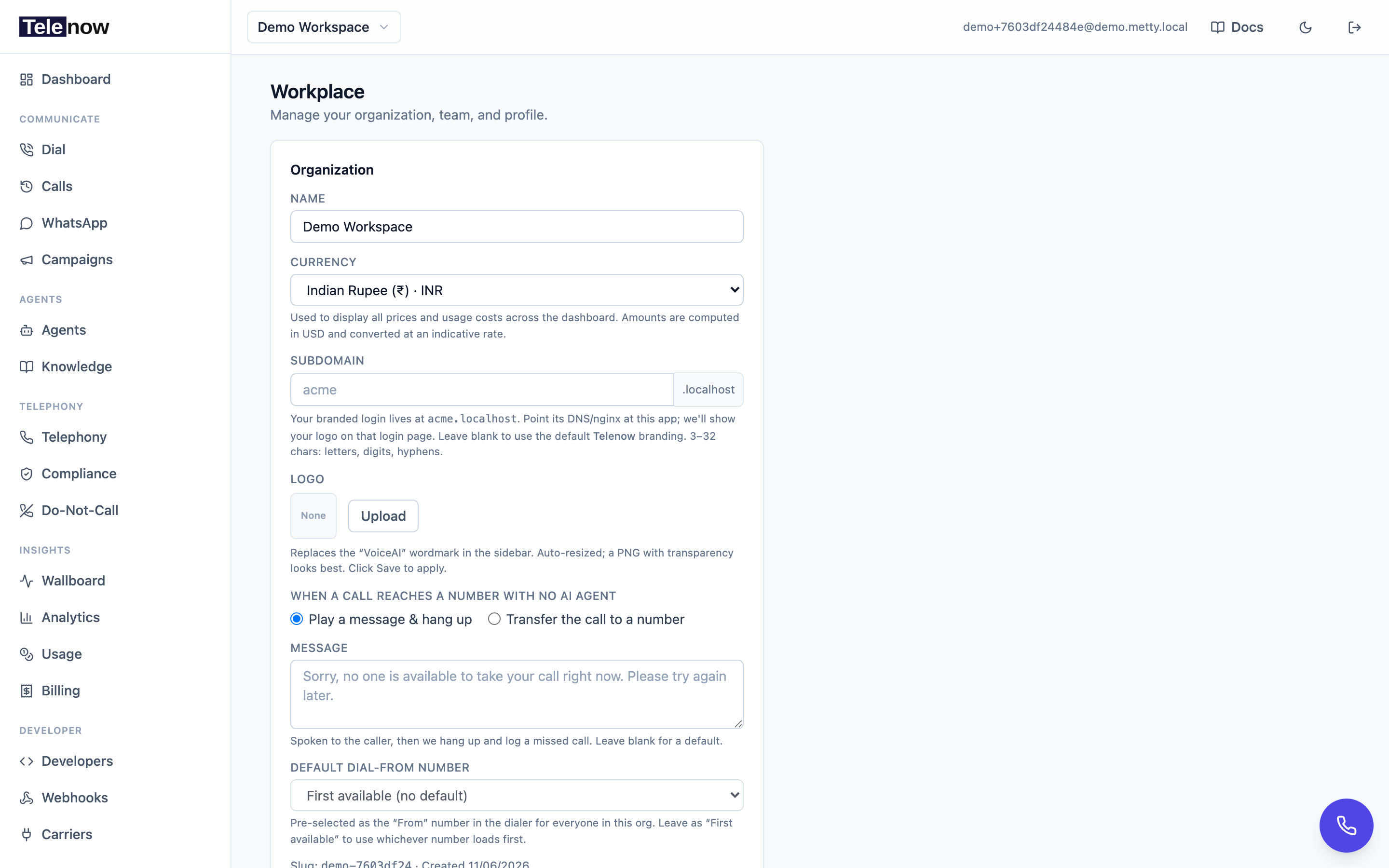
Branding lives in Workplace — upload your logo and set your org's subdomain; the login page and dashboard then carry your brand.
Workspace logo
Upload your organization's logo under Settings → Workplace → Organization:
- Next to Logo, click Upload (or Replace if one exists) and choose an image file.
- The image is automatically downscaled (longest side ~256px) — a transparent PNG looks best.
- Click Save to apply.
The logo replaces the default Telenow wordmark in the dashboard sidebar and on your branded login screen. Click Remove then Save to clear it back to the default. The logo is stored on your org record and rendered directly — there's no separate upload step or file size you need to manage beyond picking an image.
Custom subdomain
Set a subdomain for your workspace so your team signs in at a branded URL.
- Go to Settings → Workplace → Organization.
- In the Subdomain field, type your label (e.g.
acme). The field shows a live preview of the full host and accepts only lowercase letters, digits and hyphens. - Click Save.
Your branded login then lives at https://acme.<your-base-domain> — the base domain is wherever this Telenow deployment is hosted (for example acme.telenow.app), not a fixed telenow.ai. The host suffix shown next to the field is taken from the current site, so the preview always reflects your real domain.
Subdomain rules (validated as you type and again on save):
- 3–32 characters, lowercase letters, digits and hyphens only.
- No leading, trailing, or double hyphens.
- Must be unique across all organizations — taken names are rejected.
- Reserved labels (such as
www,app,api,admin,dashboard,console,demo,telenow, …) can't be claimed.
Leave the field blank and save to clear the subdomain and revert to the default Telenow branding.
DNS/routing is a one-time Telenow-contact task. Choosing the subdomain in the dashboard is self-serve, but actually routing
acme.<your-base-domain>to the app (DNS records and the reverse-proxy/nginx mapping) is handled on the infrastructure side and is not something you can do from the dashboard. Pick your subdomain, then reach out to your Telenow contact to have the routing pointed at the app.
How branding resolves
- Login screen — when someone visits a subdomain, the login page reads the leftmost label from the hostname and asks a public, pre-auth lookup for that org's name and logo, so your brand appears before anyone signs in.
- Valid subdomain → shows that organization's logo and name ("Sign in to Acme").
- Unknown subdomain → the page bounces back to the standard apex login with default Telenow branding (only a confirmed lookup miss triggers this; a transient API error keeps the branded page).
- Dashboard — once signed in, the current organization's logo is used throughout the shell; everywhere it isn't set falls back to the Telenow default.
Demo mode on branded logins
On a branded subdomain login, the Explore demo mode option is hidden for a cleaner, owned experience. This is enforced by the frontend (the login page simply doesn't render the demo entry when it detects a subdomain) — it's a presentation choice, not a server-side access control. Demo mode remains available on the main (apex) login. See Team & workplace for what demo mode does.
Widgets
The embeddable widget and embed guide run on your own site under your domain, so the customer-facing voice/chat experience already carries your brand — no extra branding step is required there.
Tips
- A PNG with transparency sits cleanly on both light and dark sidebar backgrounds.
- Keep the subdomain short and memorable — it's the URL your whole team will type.
- The subdomain must be unique platform-wide; if your first choice is taken, the dashboard tells you on save.
Troubleshooting
- "That subdomain is already taken." Another organization is using it. Pick a different label.
- "That subdomain is reserved." It collides with a system hostname. Choose another.
- "Subdomain must be 3–32 chars…" The value breaks the format rules (length, allowed characters, or hyphen placement). Fix and save again.
- Branded URL doesn't load. The subdomain is saved in the dashboard but its DNS/routing hasn't been pointed at the app yet — contact your Telenow contact to complete the one-time routing setup.
- Branded login shows default Telenow branding. The subdomain lookup returned no match — confirm the subdomain is saved on the Organization tab and that you're visiting the exact host shown in the field's preview.